# Add Extension Attribute to User
# Description
This article will detail how to add an extension attribute to a user that will allow them to access the dynamic Sharepoint security groups
# Resolution
```
Domain Controller - Active Directory Users and Computers
Enable View -> Advanced Features
Attribute Editor -> "extentionAttribute1"
```
[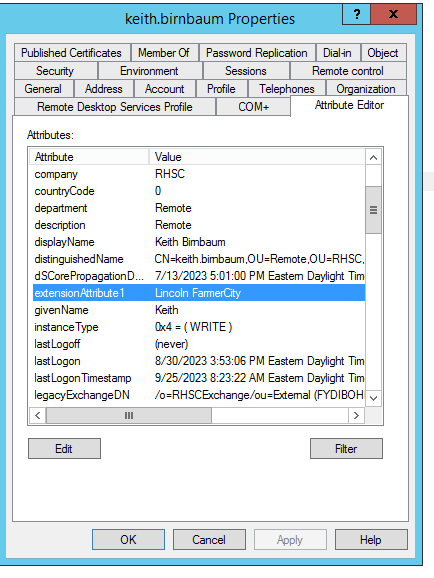](https://docs.coltscomputer.services/uploads/images/gallery/2024-01/vhbwNbG7Jj3PkVWe-image.png)
The following powershell command can be used on a Domain Controller
First we run this command to check the current extensionattribute1 value. You do not want to overwrite that, but add to it.
Get-ADUser -Identity $User -Properties extensionAttribute1
For example, the command might return the user has Williams Winterset Albion already as extension attributes
Run this command to set the new attribute string, including what was already done
Set-ADUser –Identity $User -add @{"extensionattribute1"="MyString"}
Finally run "Get-ADUser -Identity $User -Properties extensionAttribute1" one last time to confirm