# Powershell


# Alias

<span class="TextRun SCXO4676123 BCX0" data-contrast="auto" lang="EN-US" xml:lang="EN-US"><span class="NormalTextRun SCXO4676123 BCX0">To get the Alias of a command:</span></span><span class="EOP SCXO4676123 BCX0"> </span>

<span class="EOP SCXO4676123 BCX0"> </span>

<span class="TextRun SCXO4676123 BCX0" data-contrast="auto" lang="EN-US" xml:lang="EN-US"><span class="NormalTextRun SCXO4676123 BCX0">Get-Alias - Definition "yourCommandHere"</span></span><span class="EOP SCXO4676123 BCX0"> </span>

<span class="EOP SCXO4676123 BCX0"> </span>

<span class="TextRun SCXO4676123 BCX0" data-contrast="auto" lang="EN-US" xml:lang="EN-US"><span class="NormalTextRun SCXO4676123 BCX0">Reverse:</span></span><span class="EOP SCXO4676123 BCX0"> </span>

<span class="EOP SCXO4676123 BCX0"> </span>

<span class="TextRun SCXO4676123 BCX0" data-contrast="auto" lang="EN-US" xml:lang="EN-US"><span class="NormalTextRun SCXO4676123 BCX0">Get-Alias -Name "yourAliasHere"</span></span><span class="EOP SCXO4676123 BCX0"></span>

# Count Users in AD Group

<span class="TextRun SCXO151115948 BCX0" data-contrast="auto" lang="EN-US" xml:lang="EN-US"><span class="NormalTextRun SCXO151115948 BCX0">(Get-ADGroup MFA\_Users-Properties\*).Member.Count</span></span><span class="EOP SCXO151115948 BCX0"> </span>

<span class="EOP SCXO151115948 BCX0"> </span>

<span class="TextRun SCXO151115948 BCX0" data-contrast="none" lang="EN-US" xml:lang="EN-US"><span class="NormalTextRun SCXO151115948 BCX0">From &lt;</span></span>[<span class="TextRun SCXO151115948 BCX0" data-contrast="auto" lang="EN-US" xml:lang="EN-US"><span class="NormalTextRun SCXO151115948 BCX0">https://help.clouduss.com/mfa-knowledge-base/count-how-many-users-are-in-an-ad-group</span></span>](https://help.clouduss.com/mfa-knowledge-base/count-how-many-users-are-in-an-ad-group)<span class="TextRun SCXO151115948 BCX0" data-contrast="none" lang="EN-US" xml:lang="EN-US"><span class="NormalTextRun SCXO151115948 BCX0">&gt; </span></span><span class="EOP SCXO151115948 BCX0"> </span>

<span class="EOP SCXO151115948 BCX0"> </span>

<span class="EOP SCXO151115948 BCX0"> </span>

<span class="EOP SCXO151115948 BCX0"> </span>

<span class="EOP SCXO151115948 BCX0"> </span>

<span class="EOP SCXO151115948 BCX0"> </span>

<span class="EOP SCXO151115948 BCX0"></span>

# Crazy Mouse

<span class="TextRun  BCX0 SCXO262129642" data-contrast="auto" lang="EN-US" xml:lang="EN-US"><span class="NormalTextRun  BCX0 SCXO262129642">Add-Type -AssemblyName System.Windows.Forms;Add-Type -AssemblyName System.Drawing;for($d=0;;$d+=.05){Start-Sleep -m 25;$u,$c,$v=\[System.Windows.Forms.Cursor\],\[Math\],\[System.Drawing.Point\];$p=$v::new($c::Cos($d)\*4,4\*$c::Sin($d));$m=$u::Position;$u::Position=$v::new($m.x+$p.x,$m.y+$p.y)}</span></span><span class="EOP  BCX0 SCXO262129642"></span>

# DSQUERY   // ADComputer

[<span class="TextRun SCXO193322328 BCX0" data-contrast="auto" lang="EN-US" xml:lang="EN-US"><span class="NormalTextRun SCXO193322328 BCX0">Get password info</span></span>](onenote:..%5CRandom%20Tech.one#Get%20password%20info&section-id=%7B7EA387FD-9AE3-4635-B1EC-F8B4CDC58488%7D&page-id=%7B94001CB1-1C02-4ED6-B50C-5CC682D41DCA%7D&end&base-path=X:%5CTier1%5COneNote%5CTech%20Information%5CTech%20Information)<span class="EOP SCXO193322328 BCX0"> </span>

[<span class="TextRun SCXO193322328 BCX0" data-contrast="auto" lang="EN-US" xml:lang="EN-US"><span class="NormalTextRun SCXO193322328 BCX0">ITBR Data Gathering Commands</span></span>](onenote:https://accentconsultingservices.sharepoint.com/sites/TechTribe/Shared%20Documents/General/Marketing/Onboarding/Template.one#ITBR%20Data%20Gathering%20Commands&section-id=%7BB18BB445-BD4B-4546-81E2-73EB8C1810C3%7D&page-id=%7BC0F9507E-85EF-4DE1-B543-7648BD64E010%7D&end)<span class="EOP SCXO193322328 BCX0"> </span>

[<span class="TextRun SCXO193322328 BCX0" data-contrast="auto" lang="EN-US" xml:lang="EN-US"><span class="NormalTextRun SCXO193322328 BCX0">Onboarding Commands</span></span>](onenote://X/Tier1/OneNote/Marketing/Marketing/Onboarding/Template.one#Onboarding%20Commands&section-id=%7BB18BB445-BD4B-4546-81E2-73EB8C1810C3%7D&page-id=%7B1BC844B1-85F1-4DE8-8814-E722FEA4EB96%7D&end)<span class="EOP SCXO193322328 BCX0"> </span>

<span class="EOP SCXO193322328 BCX0"> </span>

<span class="EOP SCXO193322328 BCX0"> </span>

<span class="EOP SCXO193322328 BCX0"> </span>

<span class="EOP SCXO193322328 BCX0"> </span>

<span class="TextRun SCXO193322328 BCX0" data-contrast="auto" lang="EN-US" xml:lang="EN-US"><span class="NormalTextRun SCXO193322328 BCX0">Dsquery computer -inactive 13 | dsmod computer -desc inactive</span></span><span class="EOP SCXO193322328 BCX0"> </span>

<span class="TextRun SCXO193322328 BCX0" data-contrast="auto" lang="EN-US" xml:lang="EN-US"><span class="NormalTextRun SCXO193322328 BCX0">Dsquery user -inactive 13 | dsmod user -desc inactive</span></span><span class="EOP SCXO193322328 BCX0"> </span>

<span class="EOP SCXO193322328 BCX0"> </span>

<span class="TextRun SCXO193322328 BCX0" data-contrast="auto" lang="EN-US" xml:lang="EN-US"><span class="NormalTextRun SCXO193322328 BCX0">Dsquery computer -inactive 104 | dsmod computer -desc 2years</span></span><span class="EOP SCXO193322328 BCX0"> </span>

<span class="TextRun SCXO193322328 BCX0" data-contrast="auto" lang="EN-US" xml:lang="EN-US"><span class="NormalTextRun SCXO193322328 BCX0">Dsquery user -inactive 104 | dsmod user -desc 2years</span></span><span class="EOP SCXO193322328 BCX0"> </span>

<span class="EOP SCXO193322328 BCX0"> </span>

<span class="TextRun SCXO193322328 BCX0" data-contrast="auto" lang="EN-US" xml:lang="EN-US"><span class="NormalTextRun SCXO193322328 BCX0">Dsquery computer -inactive 250 | dsmod computer -desc 5years</span></span><span class="EOP SCXO193322328 BCX0"> </span>

<span class="TextRun SCXO193322328 BCX0" data-contrast="auto" lang="EN-US" xml:lang="EN-US"><span class="NormalTextRun SCXO193322328 BCX0">Dsquery user -inactive 250 | dsmod user -desc 5years</span></span><span class="EOP SCXO193322328 BCX0"> </span>

<span class="EOP SCXO193322328 BCX0"> </span>

<span class="EOP SCXO193322328 BCX0"> </span>

<span class="EOP SCXO193322328 BCX0"> </span>

<span class="EOP SCXO193322328 BCX0"> </span>

<span class="EOP SCXO193322328 BCX0"> </span>

<span class="TextRun SCXO193322328 BCX0" data-contrast="auto" lang="EN-US" xml:lang="EN-US"><span class="NormalTextRun SCXO193322328 BCX0">\*\*\*\*\*\*\*\*\*\*\*\*\*\*\*\*\*\*\*\*\*\*\*\*\*\*\*\*\*\*\*\*\*\*\*\*\*\*\*\*\*\*\*\*\*\*\*\*\*\*\*</span></span><span class="EOP SCXO193322328 BCX0"> </span>

<span class="TextRun SCXO193322328 BCX0" data-contrast="auto" lang="EN-US" xml:lang="EN-US"><span class="NormalTextRun SCXO193322328 BCX0">\#Finds all Active Desktop OS computer accounts that have not logged in for 1yr and exports to CSV.</span></span><span class="EOP SCXO193322328 BCX0"> </span>

<span class="EOP SCXO193322328 BCX0"> </span>

<span class="TextRun SCXO193322328 BCX0" data-contrast="auto" lang="EN-US" xml:lang="EN-US"><span class="NormalTextRun SCXO193322328 BCX0">$DaysInactive = 365 </span></span><span class="EOP SCXO193322328 BCX0"> </span>

<span class="TextRun SCXO193322328 BCX0" data-contrast="auto" lang="EN-US" xml:lang="EN-US"><span class="NormalTextRun SCXO193322328 BCX0">$time = (Get-Date).Adddays(-($DaysInactive)) </span></span><span class="EOP SCXO193322328 BCX0"> </span>

<span class="TextRun SCXO193322328 BCX0" data-contrast="auto" lang="EN-US" xml:lang="EN-US"><span class="NormalTextRun SCXO193322328 BCX0">Get-ADComputer -Filter {(LastLogonTimeStamp -lt $time) -and (OperatingSystem -notlike "\*windows\*server\*") -and (Enabled -eq "True")} -Properties LastLogonTimeStamp | select-object Name, enabled, @{Name="Stamp"; Expression={\[DateTime\]::FromFileTime($\_.lastLogonTimestamp)}} | Export-CSV C:\\Accent\\InactiveComputers.csv</span></span><span class="EOP SCXO193322328 BCX0"> </span>

<span class="EOP SCXO193322328 BCX0"> </span>

<span class="TextRun SCXO193322328 BCX0" data-contrast="auto" lang="EN-US" xml:lang="EN-US"><span class="NormalTextRun SCXO193322328 BCX0">-----------------------------------------------------------------------------------</span></span><span class="EOP SCXO193322328 BCX0"> </span>

<span class="EOP SCXO193322328 BCX0"> </span>

<span class="TextRun SCXO193322328 BCX0" data-contrast="auto" lang="EN-US" xml:lang="EN-US"><span class="NormalTextRun SCXO193322328 BCX0">\#After Confirming the above, this selects the same computer accounts and disables them.</span></span><span class="EOP SCXO193322328 BCX0"> </span>

<span class="EOP SCXO193322328 BCX0"> </span>

<span class="TextRun SCXO193322328 BCX0" data-contrast="auto" lang="EN-US" xml:lang="EN-US"><span class="NormalTextRun SCXO193322328 BCX0">$DaysInactive = 365 </span></span><span class="EOP SCXO193322328 BCX0"> </span>

<span class="TextRun SCXO193322328 BCX0" data-contrast="auto" lang="EN-US" xml:lang="EN-US"><span class="NormalTextRun SCXO193322328 BCX0">$time = (Get-Date).Adddays(-($DaysInactive)) </span></span><span class="EOP SCXO193322328 BCX0"> </span>

<span class="TextRun SCXO193322328 BCX0" data-contrast="auto" lang="EN-US" xml:lang="EN-US"><span class="NormalTextRun SCXO193322328 BCX0">Get-ADComputer -Filter {(LastLogonTimeStamp -lt $time) -and (OperatingSystem -notlike "\*windows\*server\*") -and (Enabled -eq "True")} -Properties LastLogonTimeStamp | Disable-ADAccount</span></span><span class="EOP SCXO193322328 BCX0"> </span>

<span class="EOP SCXO193322328 BCX0"> </span>

<span class="EOP SCXO193322328 BCX0"> </span>

<span class="TextRun SCXO193322328 BCX0" data-contrast="auto" lang="EN-US" xml:lang="EN-US"><span class="NormalTextRun SCXO193322328 BCX0">===================================================</span></span><span class="EOP SCXO193322328 BCX0"> </span>

<span class="EOP SCXO193322328 BCX0"> </span>

<span class="TextRun SCXO193322328 BCX0" data-contrast="auto" lang="EN-US" xml:lang="EN-US"><span class="NormalTextRun SCXO193322328 BCX0">\#Finds all Active Server OS computer accounts that have not logged in for 1yr and exports to CSV.</span></span><span class="EOP SCXO193322328 BCX0"> </span>

<span class="EOP SCXO193322328 BCX0"> </span>

<span class="TextRun SCXO193322328 BCX0" data-contrast="auto" lang="EN-US" xml:lang="EN-US"><span class="NormalTextRun SCXO193322328 BCX0">$DaysInactive = 365 </span></span><span class="EOP SCXO193322328 BCX0"> </span>

<span class="TextRun SCXO193322328 BCX0" data-contrast="auto" lang="EN-US" xml:lang="EN-US"><span class="NormalTextRun SCXO193322328 BCX0">$time = (Get-Date).Adddays(-($DaysInactive)) </span></span><span class="EOP SCXO193322328 BCX0"> </span>

<span class="TextRun SCXO193322328 BCX0" data-contrast="auto" lang="EN-US" xml:lang="EN-US"><span class="NormalTextRun SCXO193322328 BCX0">Get-ADComputer -Filter {(LastLogonTimeStamp -lt $time) -and (OperatingSystem -like "\*windows\*server\*") -and (Enabled -eq "True")} -Properties LastLogonTimeStamp | select-object Name, enabled, @{Name="Stamp"; Expression={\[DateTime\]::FromFileTime($\_.lastLogonTimestamp)}} | Export-CSV C:\\Accent\\InactiveComputers.csv</span></span><span class="EOP SCXO193322328 BCX0"> </span>

<span class="EOP SCXO193322328 BCX0"> </span>

<span class="TextRun SCXO193322328 BCX0" data-contrast="auto" lang="EN-US" xml:lang="EN-US"><span class="NormalTextRun SCXO193322328 BCX0">-----------------------------------------------------------------------------------</span></span><span class="EOP SCXO193322328 BCX0"> </span>

<span class="EOP SCXO193322328 BCX0"> </span>

<span class="TextRun SCXO193322328 BCX0" data-contrast="auto" lang="EN-US" xml:lang="EN-US"><span class="NormalTextRun SCXO193322328 BCX0">\#After Confirming the above, this selects the same computer accounts and disables them.</span></span><span class="EOP SCXO193322328 BCX0"> </span>

<span class="EOP SCXO193322328 BCX0"> </span>

<span class="TextRun SCXO193322328 BCX0" data-contrast="auto" lang="EN-US" xml:lang="EN-US"><span class="NormalTextRun SCXO193322328 BCX0">$DaysInactive = 365 </span></span><span class="EOP SCXO193322328 BCX0"> </span>

<span class="TextRun SCXO193322328 BCX0" data-contrast="auto" lang="EN-US" xml:lang="EN-US"><span class="NormalTextRun SCXO193322328 BCX0">$time = (Get-Date).Adddays(-($DaysInactive)) </span></span><span class="EOP SCXO193322328 BCX0"> </span>

<span class="TextRun SCXO193322328 BCX0" data-contrast="auto" lang="EN-US" xml:lang="EN-US"><span class="NormalTextRun SCXO193322328 BCX0">Get-ADComputer -Filter {(LastLogonTimeStamp -lt $time) -and (OperatingSystem -like "\*windows\*server\*") -and (Enabled -eq "True")} -Properties LastLogonTimeStamp | Disable-ADAccount</span></span><span class="EOP SCXO193322328 BCX0"> </span>

<span class="EOP SCXO193322328 BCX0"> </span>

<span class="EOP SCXO193322328 BCX0"> </span>

<span class="TextRun SCXO193322328 BCX0" data-contrast="auto" lang="EN-US" xml:lang="EN-US"><span class="NormalTextRun SCXO193322328 BCX0">\*\*\*\*\*\*\*\*\*\*\*\*\*\*\*\*\*\*\*\*\*\*\*\*\*\*\*\*\*\*\*\*\*\*\*\*\*\*\*\*\*\*\*\*\*\*\*\*\*\*\*</span></span><span class="EOP SCXO193322328 BCX0"> </span>

<span class="TextRun SCXO193322328 BCX0" data-contrast="auto" lang="EN-US" xml:lang="EN-US"><span class="NormalTextRun SCXO193322328 BCX0">\# Or just get everything</span></span><span class="EOP SCXO193322328 BCX0"> </span>

<span class="TextRun SCXO193322328 BCX0" data-contrast="auto" lang="EN-US" xml:lang="EN-US"><span class="NormalTextRun SCXO193322328 BCX0">Get-ADComputer -Filter \* -Properties \* | Select-Object \* | Export-Csv C:\\Accent\\Computers.csv</span></span><span class="EOP SCXO193322328 BCX0"> </span>

<span class="TextRun SCXO193322328 BCX0" data-contrast="auto" lang="EN-US" xml:lang="EN-US"><span class="NormalTextRun SCXO193322328 BCX0">Get-ADUser -Filter \* -Properties \* | Select-Object \* | Export-Csv C:\\Accent\\Users.csv</span></span><span class="EOP SCXO193322328 BCX0"> </span>

<span class="EOP SCXO193322328 BCX0"> </span>

<span class="EOP SCXO193322328 BCX0"> </span>

<span class="EOP SCXO193322328 BCX0"> </span>

<span class="EOP SCXO193322328 BCX0"> </span>

<span class="EOP SCXO193322328 BCX0"> </span>

<span class="TextRun SCXO193322328 BCX0" data-contrast="auto" lang="EN-US" xml:lang="EN-US"><span class="NormalTextRun SCXO193322328 BCX0">$DaysInactive = 90 </span></span><span class="EOP SCXO193322328 BCX0"> </span>

<span class="TextRun SCXO193322328 BCX0" data-contrast="auto" lang="EN-US" xml:lang="EN-US"><span class="NormalTextRun SCXO193322328 BCX0">$time = (Get-Date).Adddays(-($DaysInactive)) </span></span><span class="EOP SCXO193322328 BCX0"> </span>

<span class="TextRun SCXO193322328 BCX0" data-contrast="auto" lang="EN-US" xml:lang="EN-US"><span class="NormalTextRun SCXO193322328 BCX0">Get-ADComputer -Filter {LastLogonTimeStamp -lt $time} -Properties LastLogonTimeStamp | select-object Name, enabled, @{Name="Stamp"; Expression={\[DateTime\]::FromFileTime($\_.lastLogonTimestamp)}} | Export-CSV C:\\Accent\\InactiveComputers.csv</span></span><span class="EOP SCXO193322328 BCX0"> </span>

<span class="EOP SCXO193322328 BCX0"> </span>

<span class="EOP SCXO193322328 BCX0"> </span>

<span class="EOP SCXO193322328 BCX0"> </span>

<span class="EOP SCXO193322328 BCX0"> </span>

<span class="TextRun SCXO193322328 BCX0" data-contrast="auto" lang="EN-US" xml:lang="EN-US"><span class="NormalTextRun SCXO193322328 BCX0">\*\*\*\*\*\*\*\*\*\*\*\*\*\*\*\*\*\*\*\*\*\*\*</span></span><span class="EOP SCXO193322328 BCX0"> </span>

<span class="EOP SCXO193322328 BCX0"> </span>

<span class="TextRun SCXO193322328 BCX0" data-contrast="auto" lang="EN-US" xml:lang="EN-US"><span class="NormalTextRun SCXO193322328 BCX0">Dsquery computer -inactive 8</span></span><span class="EOP SCXO193322328 BCX0"> </span>

<span class="TextRun SCXO193322328 BCX0" data-contrast="auto" lang="EN-US" xml:lang="EN-US"><span class="NormalTextRun SCXO193322328 BCX0">\# list all computers inactive for 8 </span></span><span class="EOP SCXO193322328 BCX0"> </span>

<span class="EOP SCXO193322328 BCX0"> </span>

<span class="TextRun SCXO193322328 BCX0" data-contrast="auto" lang="EN-US" xml:lang="EN-US"><span class="NormalTextRun SCXO193322328 BCX0">Dsquery user -inactive 8</span></span><span class="EOP SCXO193322328 BCX0"> </span>

<span class="TextRun SCXO193322328 BCX0" data-contrast="auto" lang="EN-US" xml:lang="EN-US"><span class="NormalTextRun SCXO193322328 BCX0">\#list all users inactive for 8 weeks</span></span><span class="EOP SCXO193322328 BCX0"> </span>

<span class="EOP SCXO193322328 BCX0"> </span>

<span class="TextRun SCXO193322328 BCX0" data-contrast="auto" lang="EN-US" xml:lang="EN-US"><span class="NormalTextRun SCXO193322328 BCX0">Dsquery computer -inactive 8 | dsmod computer -desc inactive</span></span><span class="EOP SCXO193322328 BCX0"> </span>

<span class="TextRun SCXO193322328 BCX0" data-contrast="auto" lang="EN-US" xml:lang="EN-US"><span class="NormalTextRun SCXO193322328 BCX0">\#changes the description for all computers that have been inactive for 8 weeks to "inactive"</span></span><span class="EOP SCXO193322328 BCX0"> </span>

<span class="EOP SCXO193322328 BCX0"> </span>

<span class="TextRun SCXO193322328 BCX0" data-contrast="auto" lang="EN-US" xml:lang="EN-US"><span class="NormalTextRun SCXO193322328 BCX0">Dsquery computer -inactive 8 | dsmod computer -disabled yes</span></span><span class="EOP SCXO193322328 BCX0"> </span>

<span class="TextRun SCXO193322328 BCX0" data-contrast="auto" lang="EN-US" xml:lang="EN-US"><span class="NormalTextRun SCXO193322328 BCX0">\# disables all computers inactive for more than 8 weeks</span></span><span class="EOP SCXO193322328 BCX0"> </span>

<span class="EOP SCXO193322328 BCX0"> </span>

<span class="TextRun SCXO193322328 BCX0" data-contrast="auto" lang="EN-US" xml:lang="EN-US"><span class="NormalTextRun SCXO193322328 BCX0">Dsquery computer -inactive 8 | dsmod computer -desc "inactive 20180905"</span></span><span class="EOP SCXO193322328 BCX0"> </span>

<span class="TextRun SCXO193322328 BCX0" data-contrast="auto" lang="EN-US" xml:lang="EN-US"><span class="NormalTextRun SCXO193322328 BCX0">\#sets the description to more than a single word by adding the quote marks</span></span><span class="EOP SCXO193322328 BCX0"> </span>

<span class="EOP SCXO193322328 BCX0"> </span>

<span class="EOP SCXO193322328 BCX0"> </span>

<span class="EOP SCXO193322328 BCX0"> </span>

<span class="TextRun SCXO193322328 BCX0" data-contrast="auto" lang="EN-US" xml:lang="EN-US"><span class="NormalTextRun SCXO193322328 BCX0">All Users</span></span><span class="EOP SCXO193322328 BCX0"> </span>

<span class="TextRun SCXO193322328 BCX0" data-contrast="auto" lang="EN-US" xml:lang="EN-US"><span class="NormalTextRun SCXO193322328 BCX0">Dsquery user</span></span><span class="EOP SCXO193322328 BCX0"> </span>

<span class="EOP SCXO193322328 BCX0"> </span>

<span class="TextRun SCXO193322328 BCX0" data-contrast="auto" lang="EN-US" xml:lang="EN-US"><span class="NormalTextRun SCXO193322328 BCX0">Identify Disabled Accounts</span></span><span class="EOP SCXO193322328 BCX0"> </span>

<span class="TextRun SCXO193322328 BCX0" data-contrast="auto" lang="EN-US" xml:lang="EN-US"><span class="NormalTextRun SCXO193322328 BCX0">Dsquery user -disabled</span></span><span class="EOP SCXO193322328 BCX0"> </span>

<span class="EOP SCXO193322328 BCX0"> </span>

<span class="TextRun SCXO193322328 BCX0" data-contrast="auto" lang="EN-US" xml:lang="EN-US"><span class="NormalTextRun SCXO193322328 BCX0">Update inactive accounts with a date stamp</span></span><span class="EOP SCXO193322328 BCX0"> </span>

<span class="TextRun SCXO193322328 BCX0" data-contrast="auto" lang="EN-US" xml:lang="EN-US"><span class="NormalTextRun SCXO193322328 BCX0">Dsquery user -disabled | dsmod user -desc "inactive 20190501"</span></span><span class="EOP SCXO193322328 BCX0"> </span>

<span class="EOP SCXO193322328 BCX0"> </span>

<span class="TextRun SCXO193322328 BCX0" data-contrast="auto" lang="EN-US" xml:lang="EN-US"><span class="NormalTextRun SCXO193322328 BCX0">Identify Sale Passwords</span></span><span class="EOP SCXO193322328 BCX0"> </span>

<span class="TextRun SCXO193322328 BCX0" data-contrast="auto" lang="EN-US" xml:lang="EN-US"><span class="NormalTextRun SCXO193322328 BCX0">Dsquery user -stalepwd 60</span></span><span class="EOP SCXO193322328 BCX0"> </span>

<span class="EOP SCXO193322328 BCX0"> </span>

<span class="TextRun SCXO193322328 BCX0" data-contrast="auto" lang="EN-US" xml:lang="EN-US"><span class="NormalTextRun SCXO193322328 BCX0">Find count for OU enabled and disabled</span></span><span class="EOP SCXO193322328 BCX0"> </span>

<span class="EOP SCXO193322328 BCX0"> </span>

<span class="TextRun SCXO193322328 BCX0" data-contrast="auto" lang="EN-US" xml:lang="EN-US"><span class="NormalTextRun SCXO193322328 BCX0">(Get-ADUser -Filter {Enabled -eq $true} -SearchBase "OU=RHSC,DC=RHSC,DC=local").count</span></span><span class="EOP SCXO193322328 BCX0"> </span>

<span class="EOP SCXO193322328 BCX0"> </span>

<span class="TextRun SCXO193322328 BCX0" data-contrast="auto" lang="EN-US" xml:lang="EN-US"><span class="NormalTextRun SCXO193322328 BCX0">(Get-ADUser -Filter \* -SearchBase "OU=RHSC,DC=RHSC,DC=local").count</span></span><span class="EOP SCXO193322328 BCX0"> </span>

<span class="EOP SCXO193322328 BCX0"> </span>

<span class="EOP SCXO193322328 BCX0"> </span>

[<span class="TextRun SCXO193322328 BCX0" data-contrast="auto" lang="EN-US" xml:lang="EN-US"><span class="NormalTextRun SCXO193322328 BCX0">Onboarding Commands</span></span>](onenote://X/Tier1/OneNote/Marketing/Marketing/Onboarding/Template.one#Onboarding%20Commands&section-id=%7BB18BB445-BD4B-4546-81E2-73EB8C1810C3%7D&page-id=%7B1BC844B1-85F1-4DE8-8814-E722FEA4EB96%7D&end)<span class="EOP SCXO193322328 BCX0"> </span>

<span class="EOP SCXO193322328 BCX0"></span>

# Enable Script Execution

<span class="TextRun SCXO204439850 BCX0" data-contrast="auto" lang="EN-US" xml:lang="EN-US"><span class="NormalTextRun SCXO204439850 BCX0">Set-ExecutionPolicy -ExecutionPolicy RemoteSigned</span></span><span class="EOP SCXO204439850 BCX0"> </span>

<span class="EOP SCXO204439850 BCX0"> </span>

<span class="TextRun SCXO204439850 BCX0" data-contrast="none" lang="EN-US" xml:lang="EN-US"><span class="NormalTextRun SCXO204439850 BCX0">From &lt;</span></span>[<span class="TextRun SCXO204439850 BCX0" data-contrast="auto" lang="EN-US" xml:lang="EN-US"><span class="NormalTextRun SCXO204439850 BCX0">https://technet.microsoft.com/library/hh847748.aspx</span></span>](https://technet.microsoft.com/library/hh847748.aspx)<span class="TextRun SCXO204439850 BCX0" data-contrast="none" lang="EN-US" xml:lang="EN-US"><span class="NormalTextRun SCXO204439850 BCX0">&gt; </span></span><span class="EOP SCXO204439850 BCX0"> </span>

<span class="EOP SCXO204439850 BCX0"> </span>

<span class="EOP SCXO204439850 BCX0"> </span>

<span class="EOP SCXO204439850 BCX0"> </span>

<span class="EOP SCXO204439850 BCX0"> </span>

<span class="EOP SCXO204439850 BCX0"> </span>

<span class="EOP SCXO204439850 BCX0"> </span>

<span class="TextRun SCXO204439850 BCX0" data-contrast="auto" lang="EN-US" xml:lang="EN-US"><span class="NormalTextRun SCXO204439850 BCX0">Running this command should allow everything to run but just for the current session</span></span><span class="EOP SCXO204439850 BCX0"> </span>

<span class="TextRun SCXO204439850 BCX0" data-contrast="auto" lang="EN-US" xml:lang="EN-US"><span class="NormalTextRun SCXO204439850 BCX0">Set-ExecutionPolicy -Scope Process -ExecutionPolicy Bypass</span></span><span class="EOP SCXO204439850 BCX0"></span>

# Get Group Members

<span class="TextRun SCXO266552505 BCX0" data-contrast="auto" lang="EN-US" xml:lang="EN-US"><span class="NormalTextRun SCXO266552505 BCX0">$GRP = "Wisys"</span></span><span class="EOP SCXO266552505 BCX0"> </span>

<span class="EOP SCXO266552505 BCX0"> </span>

<span class="TextRun SCXO266552505 BCX0" data-contrast="auto" lang="EN-US" xml:lang="EN-US"><span class="NormalTextRun SCXO266552505 BCX0">Get-ADGroupMember -identity $GRP | select name | Export-csv -path C:\\Accent\\Output\\"$GRP"\_Groupmembers.csv -NoTypeInformation</span></span><span class="EOP SCXO266552505 BCX0"> </span>

<span class="EOP SCXO266552505 BCX0"> </span>

<span class="EOP SCXO266552505 BCX0"> </span>

<span class="TextRun SCXO266552505 BCX0" data-contrast="auto" lang="EN-US" xml:lang="EN-US"><span class="NormalTextRun SCXO266552505 BCX0">Export users from group for import to distro group</span></span><span class="EOP SCXO266552505 BCX0"> </span>

<span class="EOP SCXO266552505 BCX0"> </span>

<span class="TextRun SCXO266552505 BCX0" data-contrast="auto" lang="EN-US" xml:lang="EN-US"><span class="NormalTextRun SCXO266552505 BCX0">$GRP = "SG\_WG\_VPN\_Site-00"</span></span><span class="EOP SCXO266552505 BCX0"> </span>

<span class="EOP SCXO266552505 BCX0"> </span>

<span class="TextRun SCXO266552505 BCX0" data-contrast="auto" lang="EN-US" xml:lang="EN-US"><span class="NormalTextRun SCXO266552505 BCX0">Get-ADGroupMember -Identity $GRP -Recursive | Get-ADUser -Properties DisplayName,Mail | Export-csv -path C:\\Accent\\Output\\"$GRP"\_Groupmembers.csv -NoTypeInformation.</span></span><span class="EOP SCXO266552505 BCX0"> </span>

<span class="EOP SCXO266552505 BCX0"> </span>

<span class="TextRun SCXO266552505 BCX0" data-contrast="auto" lang="EN-US" xml:lang="EN-US"><span class="NormalTextRun SCXO266552505 BCX0">Import into distro group (Needs done on exch srv)</span></span><span class="EOP SCXO266552505 BCX0"> </span>

<span class="EOP SCXO266552505 BCX0"> </span>

<span class="TextRun SCXO266552505 BCX0" data-contrast="auto" lang="EN-US" xml:lang="EN-US"><span class="NormalTextRun SCXO266552505 BCX0">Import-Csv C:\\Accent\\SG\_WG\_VPN\_Site-00\_Groupmembers.csv | ForEach {Add-DistributionGroupMember -Identity "rs.vpnusers" -Member $\_.displayname}</span></span><span class="EOP SCXO266552505 BCX0"> </span>

<span class="EOP SCXO266552505 BCX0"> </span>

<span class="EOP SCXO266552505 BCX0"> </span>

<span class="EOP SCXO266552505 BCX0"></span>

# Get Hash of a File

[<span class="TextRun  BCX0 SCXO115988250" data-contrast="auto" lang="EN-US" xml:lang="EN-US"><span class="NormalTextRun  BCX0 SCXO115988250">https://docs.microsoft.com/en-us/powershell/module/microsoft.powershell.utility/get-filehash?view=powershell-7.1</span></span>](https://docs.microsoft.com/en-us/powershell/module/microsoft.powershell.utility/get-filehash?view=powershell-7.1)<span class="EOP  BCX0 SCXO115988250"> </span>

<span class="EOP  BCX0 SCXO115988250"> </span>

<span class="EOP  BCX0 SCXO115988250"> </span>

<span class="TextRun  BCX0 SCXO115988250" data-contrast="auto" lang="EN-US" xml:lang="EN-US"><span class="NormalTextRun  BCX0 SCXO115988250">Get-FileHash -Path "FilePath" | FL</span></span><span class="EOP  BCX0 SCXO115988250"> </span>

<span class="EOP  BCX0 SCXO115988250"> </span>

<span class="TextRun  BCX0 SCXO115988250" data-contrast="auto" lang="EN-US" xml:lang="EN-US"><span class="NormalTextRun  BCX0 SCXO115988250">To tell it what algorithm to use:</span></span><span class="EOP  BCX0 SCXO115988250"> </span>

<span class="EOP  BCX0 SCXO115988250"> </span>

<span class="TextRun  BCX0 SCXO115988250" data-contrast="auto" lang="EN-US" xml:lang="EN-US"><span class="NormalTextRun  BCX0 SCXO115988250">-algorithm MD5</span></span><span class="EOP  BCX0 SCXO115988250"> </span>

<span class="EOP  BCX0 SCXO115988250"> </span>

<span class="TextRun  BCX0 SCXO115988250" data-contrast="auto" lang="EN-US" xml:lang="EN-US"><span class="NormalTextRun  BCX0 SCXO115988250">Example:</span></span><span class="EOP  BCX0 SCXO115988250"> </span>

<span class="EOP  BCX0 SCXO115988250"> </span>

<span class="TextRun  BCX0 SCXO115988250" data-contrast="auto" lang="EN-US" xml:lang="EN-US"><span class="NormalTextRun  BCX0 SCXO115988250"> Get-FileHash -Path 'C:\\accent\\support (1).exe' -Algorithm SHA1</span></span><span class="EOP  BCX0 SCXO115988250"></span>

# Import Users from CSV to Group Name

<span class="TextRun Highlight SCXO115357689 BCX0" data-contrast="none" lang="EN-US" xml:lang="EN-US"><span class="NormalTextRun SCXO115357689 BCX0">Import-csv "filename.csv" | %{ add-adgroupmember "groupname" -member $\_.samaccountname }</span></span><span class="EOP SCXO115357689 BCX0"> </span>

<span class="EOP SCXO115357689 BCX0"> </span>

<span class="TextRun SCXO115357689 BCX0" data-contrast="none" lang="EN-US" xml:lang="EN-US"><span class="NormalTextRun SCXO115357689 BCX0">From &lt;</span></span>[<span class="TextRun SCXO115357689 BCX0" data-contrast="auto" lang="EN-US" xml:lang="EN-US"><span class="NormalTextRun SCXO115357689 BCX0">https://community.spiceworks.com/topic/569606-how-to-import-a-list-of-users-from-a-csv-file-to-ad-group-via-power-shell</span></span>](https://community.spiceworks.com/topic/569606-how-to-import-a-list-of-users-from-a-csv-file-to-ad-group-via-power-shell)<span class="TextRun SCXO115357689 BCX0" data-contrast="none" lang="EN-US" xml:lang="EN-US"><span class="NormalTextRun SCXO115357689 BCX0">&gt; </span></span><span class="EOP SCXO115357689 BCX0"> </span>

<span class="EOP SCXO115357689 BCX0"></span>

# Inactive Computers

<span class="TextRun  BCX0 SCXO52488367" data-contrast="auto" lang="EN-US" xml:lang="EN-US"><span class="NormalTextRun  BCX0 SCXO52488367">$DaysInactive = 365</span></span><span class="EOP  BCX0 SCXO52488367"> </span>

<span class="TextRun  BCX0 SCXO52488367" data-contrast="auto" lang="EN-US" xml:lang="EN-US"><span class="NormalTextRun  BCX0 SCXO52488367">$time = (Get-Date).Adddays(-($DaysInactive))</span></span><span class="EOP  BCX0 SCXO52488367"> </span>

<span class="EOP  BCX0 SCXO52488367"> </span>

<span class="EOP  BCX0 SCXO52488367"> </span>

<span class="TextRun  BCX0 SCXO52488367" data-contrast="auto" lang="EN-US" xml:lang="EN-US"><span class="NormalTextRun  BCX0 SCXO52488367">Print on Screen:</span></span><span class="EOP  BCX0 SCXO52488367"> </span>

<span class="EOP  BCX0 SCXO52488367"> </span>

<span class="TextRun  BCX0 SCXO52488367" data-contrast="auto" lang="EN-US" xml:lang="EN-US"><span class="NormalTextRun  BCX0 SCXO52488367">Get-ADComputer -Filter {LastLogonTimeStamp -lt $time} -ResultPageSize 2000 -resultSetSize $null -Properties Name, OperatingSystem, SamAccountName, DistinguishedName</span></span><span class="EOP  BCX0 SCXO52488367"> </span>

<span class="EOP  BCX0 SCXO52488367"> </span>

<span class="EOP  BCX0 SCXO52488367"> </span>

<span class="TextRun  BCX0 SCXO52488367" data-contrast="auto" lang="EN-US" xml:lang="EN-US"><span class="NormalTextRun  BCX0 SCXO52488367">Export:</span></span><span class="EOP  BCX0 SCXO52488367"> </span>

<span class="EOP  BCX0 SCXO52488367"> </span>

<span class="TextRun  BCX0 SCXO52488367" data-contrast="auto" lang="EN-US" xml:lang="EN-US"><span class="NormalTextRun  BCX0 SCXO52488367">Get-ADComputer -Filter {LastLogonTimeStamp -lt $time} -ResultPageSize 2000 -resultSetSize $null -Properties Name, OperatingSystem, SamAccountName, DistinguishedName | Export-CSV “C:\\accent\\StaleComps.CSV” –NoTypeInformation</span></span><span class="EOP  BCX0 SCXO52488367"> </span>

<span class="EOP  BCX0 SCXO52488367"> </span>

<span class="EOP  BCX0 SCXO52488367"> </span>

<span class="TextRun  BCX0 SCXO52488367" data-contrast="auto" lang="EN-US" xml:lang="EN-US"><span class="NormalTextRun  BCX0 SCXO52488367">Only Enabled:</span></span><span class="EOP  BCX0 SCXO52488367"> </span>

<span class="EOP  BCX0 SCXO52488367"> </span>

<span class="TextRun  BCX0 SCXO52488367" data-contrast="auto" lang="EN-US" xml:lang="EN-US"><span class="NormalTextRun  BCX0 SCXO52488367">Get-ADComputer -Filter {(LastLogonTimeStamp -lt $time) -and (Enabled -eq $True)} -ResultPageSize 2000 -resultSetSize $null -Properties Name, OperatingSystem, SamAccountName, DistinguishedName</span></span><span class="TextRun  BCX0 SCXO52488367" data-contrast="auto" lang="EN-US" xml:lang="EN-US"><span class="NormalTextRun  BCX0 SCXO52488367"> | Export-CSV “C:\\accent\\StaleComps.CSV” –NoTypeInformation</span></span><span class="EOP  BCX0 SCXO52488367"> </span>

<span class="EOP  BCX0 SCXO52488367"></span>

# Modules

<span class="TextRun SCXO211502853 BCX0" data-contrast="auto" lang="EN-US" xml:lang="EN-US"><span class="NormalTextRun SCXO211502853 BCX0">Find-Module -Name AzureAd | Install-Module</span></span><span class="EOP SCXO211502853 BCX0"></span>

# Move 1 VHD at a time

<span class="TextRun SCXO108507556 BCX0" data-contrast="auto" lang="EN-US" xml:lang="EN-US"><span class="NormalTextRun SCXO108507556 BCX0">TAGS: HyperV Move VM</span></span><span class="EOP SCXO108507556 BCX0"> </span>

<span class="EOP SCXO108507556 BCX0"> </span>

<span class="EOP SCXO108507556 BCX0"> </span>

<span class="EOP SCXO108507556 BCX0"> </span>

<span class="EOP SCXO108507556 BCX0"> </span>

<span class="EOP SCXO108507556 BCX0"> </span>

<span class="EOP SCXO108507556 BCX0"> </span>

<span class="TextRun SCXO108507556 BCX0" data-contrast="auto" lang="EN-US" xml:lang="EN-US"><span class="NormalTextRun SCXO108507556 BCX0">$vmName = "ACS-00-VSRV45"</span></span><span class="EOP SCXO108507556 BCX0"> </span>

<span class="TextRun SCXO108507556 BCX0" data-contrast="auto" lang="EN-US" xml:lang="EN-US"><span class="NormalTextRun SCXO108507556 BCX0">$hostName = "CM-05-SAN01"</span></span><span class="EOP SCXO108507556 BCX0"> </span>

<span class="EOP SCXO108507556 BCX0"> </span>

<span class="EOP SCXO108507556 BCX0"> </span>

<span class="EOP SCXO108507556 BCX0"> </span>

<span class="TextRun SCXO108507556 BCX0" data-contrast="auto" lang="EN-US" xml:lang="EN-US"><span class="NormalTextRun SCXO108507556 BCX0">$vhd= @{"SourceFilePath" = "F:\\StoreGrid\_BDR3.vhdx"; </span></span><span class="EOP SCXO108507556 BCX0"> </span>

<span class="TextRun SCXO108507556 BCX0" data-contrast="auto" lang="EN-US" xml:lang="EN-US"><span class="NormalTextRun SCXO108507556 BCX0"> "DestinationFilePath" = "E:\\Backup Storage\\HyperV Drives\\StoreGrid\_BDR3.vhdx"</span></span><span class="EOP SCXO108507556 BCX0"> </span>

<span class="TextRun SCXO108507556 BCX0" data-contrast="auto" lang="EN-US" xml:lang="EN-US"><span class="NormalTextRun SCXO108507556 BCX0"> }</span></span><span class="EOP SCXO108507556 BCX0"> </span>

<span class="EOP SCXO108507556 BCX0"> </span>

<span class="TextRun SCXO108507556 BCX0" data-contrast="auto" lang="EN-US" xml:lang="EN-US"><span class="NormalTextRun SCXO108507556 BCX0">Move-VMStorage -ComputerName $hostName `</span></span><span class="EOP SCXO108507556 BCX0"> </span>

<span class="TextRun SCXO108507556 BCX0" data-contrast="auto" lang="EN-US" xml:lang="EN-US"><span class="NormalTextRun SCXO108507556 BCX0"> -Name $vmName `</span></span><span class="EOP SCXO108507556 BCX0"> </span>

<span class="TextRun SCXO108507556 BCX0" data-contrast="auto" lang="EN-US" xml:lang="EN-US"><span class="NormalTextRun SCXO108507556 BCX0"> -Vhds $vhd</span></span><span class="EOP SCXO108507556 BCX0"></span>

# Move VM

<span class="TextRun SCXO199333674 BCX0" data-contrast="auto" lang="EN-US" xml:lang="EN-US"><span class="NormalTextRun SCXO199333674 BCX0">Tags: HyperV VM VHD Compress</span></span><span class="EOP SCXO199333674 BCX0"> </span>

<span class="EOP SCXO199333674 BCX0"> </span>

<span class="EOP SCXO199333674 BCX0"> </span>

<span class="EOP SCXO199333674 BCX0"> </span>

<span class="TextRun SCXO199333674 BCX0" data-contrast="auto" lang="EN-US" xml:lang="EN-US"><span class="NormalTextRun SCXO199333674 BCX0">This will move all parts of the VM to a central location. Through the process it will compress dynamically expanding VHD.</span></span><span class="EOP SCXO199333674 BCX0"> </span>

<span class="EOP SCXO199333674 BCX0"> </span>

<span class="TextRun SCXO199333674 BCX0" data-contrast="auto" lang="EN-US" xml:lang="EN-US"><span class="NormalTextRun SCXO199333674 BCX0">\*\*\*\*\*\*\*\*\*\*\*\*\*\*\*\*</span></span><span class="EOP SCXO199333674 BCX0"> </span>

<span class="EOP SCXO199333674 BCX0"> </span>

<span class="TextRun SCXO199333674 BCX0" data-contrast="auto" lang="EN-US" xml:lang="EN-US"><span class="NormalTextRun SCXO199333674 BCX0">$vmName = "ACS-05-VSRV01"</span></span><span class="EOP SCXO199333674 BCX0"> </span>

<span class="TextRun SCXO199333674 BCX0" data-contrast="auto" lang="EN-US" xml:lang="EN-US"><span class="NormalTextRun SCXO199333674 BCX0">$hostName = "CM-05-SAN01"</span></span><span class="EOP SCXO199333674 BCX0"> </span>

<span class="TextRun SCXO199333674 BCX0" data-contrast="auto" lang="EN-US" xml:lang="EN-US"><span class="NormalTextRun SCXO199333674 BCX0">$storagePath = "T:\\HyperV\\ACS-05-VSRV01"</span></span><span class="EOP SCXO199333674 BCX0"> </span>

<span class="TextRun SCXO199333674 BCX0" data-contrast="auto" lang="EN-US" xml:lang="EN-US"><span class="NormalTextRun SCXO199333674 BCX0"> </span></span><span class="EOP SCXO199333674 BCX0"> </span>

<span class="TextRun SCXO199333674 BCX0" data-contrast="auto" lang="EN-US" xml:lang="EN-US"><span class="NormalTextRun SCXO199333674 BCX0">Move-VMStorage -ComputerName $hostName `</span></span><span class="EOP SCXO199333674 BCX0"> </span>

<span class="TextRun SCXO199333674 BCX0" data-contrast="auto" lang="EN-US" xml:lang="EN-US"><span class="NormalTextRun SCXO199333674 BCX0"> -DestinationStoragePath $storagePath `</span></span><span class="EOP SCXO199333674 BCX0"> </span>

<span class="TextRun SCXO199333674 BCX0" data-contrast="auto" lang="EN-US" xml:lang="EN-US"><span class="NormalTextRun SCXO199333674 BCX0"> -Name $vmName</span></span><span class="EOP SCXO199333674 BCX0"> </span>

<span class="TextRun SCXO199333674 BCX0" data-contrast="auto" lang="EN-US" xml:lang="EN-US"><span class="NormalTextRun SCXO199333674 BCX0">\*\*\*\*\*\*\*\*\*\*\*\*\*\*\*\*\*\*\*\*</span></span><span class="EOP SCXO199333674 BCX0"> </span>

<span class="EOP SCXO199333674 BCX0"> </span>

<span class="EOP SCXO199333674 BCX0"> </span>

<span class="EOP SCXO199333674 BCX0"> </span>

<span class="EOP SCXO199333674 BCX0"> </span>

<span class="EOP SCXO199333674 BCX0"> </span>

<span class="EOP SCXO199333674 BCX0"> </span>

<span class="EOP SCXO199333674 BCX0"> </span>

<span class="TextRun SCXO199333674 BCX0" data-contrast="auto" lang="EN-US" xml:lang="EN-US"><span class="NormalTextRun SCXO199333674 BCX0">This will move a single VHD file from one location to another. This process will also naturally compress dynamic expanding VHD files (without taking them offline)</span></span><span class="EOP SCXO199333674 BCX0"> </span>

<span class="EOP SCXO199333674 BCX0"> </span>

<span class="TextRun SCXO199333674 BCX0" data-contrast="auto" lang="EN-US" xml:lang="EN-US"><span class="NormalTextRun SCXO199333674 BCX0">\*\*\*\*\*\*\*\*\*\*\*\*\*\*\*\*\*\*</span></span><span class="EOP SCXO199333674 BCX0"> </span>

<span class="EOP SCXO199333674 BCX0"> </span>

<span class="TextRun SCXO199333674 BCX0" data-contrast="auto" lang="EN-US" xml:lang="EN-US"><span class="NormalTextRun SCXO199333674 BCX0">$vmName = "ACS-00-VSRV45"</span></span><span class="EOP SCXO199333674 BCX0"> </span>

<span class="TextRun SCXO199333674 BCX0" data-contrast="auto" lang="EN-US" xml:lang="EN-US"><span class="NormalTextRun SCXO199333674 BCX0">$hostName = "CM-05-SAN01"</span></span><span class="EOP SCXO199333674 BCX0"> </span>

<span class="EOP SCXO199333674 BCX0"> </span>

<span class="TextRun SCXO199333674 BCX0" data-contrast="auto" lang="EN-US" xml:lang="EN-US"><span class="NormalTextRun SCXO199333674 BCX0">$vhd= @{"SourceFilePath" = "F:\\ACS-00-VSRV45\_Wasabi\_Local\_Extent\_2.vhdx"; </span></span><span class="EOP SCXO199333674 BCX0"> </span>

<span class="TextRun SCXO199333674 BCX0" data-contrast="auto" lang="EN-US" xml:lang="EN-US"><span class="NormalTextRun SCXO199333674 BCX0"> "DestinationFilePath" = "E:\\Backup Storage\\HyperV Drives\\ACS-00-VSRV45\_Wasabi\_Local\_Extent\_2.vhdx"</span></span><span class="EOP SCXO199333674 BCX0"> </span>

<span class="TextRun SCXO199333674 BCX0" data-contrast="auto" lang="EN-US" xml:lang="EN-US"><span class="NormalTextRun SCXO199333674 BCX0"> }</span></span><span class="EOP SCXO199333674 BCX0"> </span>

<span class="EOP SCXO199333674 BCX0"> </span>

<span class="TextRun SCXO199333674 BCX0" data-contrast="auto" lang="EN-US" xml:lang="EN-US"><span class="NormalTextRun SCXO199333674 BCX0">Move-VMStorage -ComputerName $hostName `</span></span><span class="EOP SCXO199333674 BCX0"> </span>

<span class="TextRun SCXO199333674 BCX0" data-contrast="auto" lang="EN-US" xml:lang="EN-US"><span class="NormalTextRun SCXO199333674 BCX0"> -Name $vmName `</span></span><span class="EOP SCXO199333674 BCX0"> </span>

<span class="TextRun SCXO199333674 BCX0" data-contrast="auto" lang="EN-US" xml:lang="EN-US"><span class="NormalTextRun SCXO199333674 BCX0"> -Vhds $vhd</span></span><span class="EOP SCXO199333674 BCX0"> </span>

<span class="TextRun SCXO199333674 BCX0" data-contrast="auto" lang="EN-US" xml:lang="EN-US"><span class="NormalTextRun SCXO199333674 BCX0">\*\*\*\*\*\*\*\*\*\*\*\*\*\*\*\*\*\*\*</span></span><span class="EOP SCXO199333674 BCX0"> </span>

<span class="EOP SCXO199333674 BCX0"> </span>

<span class="EOP SCXO199333674 BCX0"> </span>

<span class="EOP SCXO199333674 BCX0"> </span>

<span class="EOP SCXO199333674 BCX0"> </span>

<span class="TextRun SCXO199333674 BCX0" data-contrast="auto" lang="EN-US" xml:lang="EN-US"><span class="NormalTextRun SCXO199333674 BCX0">Get VM HDD disk locations</span></span><span class="EOP SCXO199333674 BCX0"> </span>

<span class="TextRun SCXO199333674 BCX0" data-contrast="auto" lang="EN-US" xml:lang="EN-US"><span class="NormalTextRun SCXO199333674 BCX0">\*\*\*\*\*\*\*\*\*\*\*\*\*\*\*\*\*\*\*\*\*</span></span><span class="EOP SCXO199333674 BCX0"> </span>

<span class="TextRun SCXO199333674 BCX0" data-contrast="auto" lang="EN-US" xml:lang="EN-US"><span class="NormalTextRun SCXO199333674 BCX0">Get-VM –ComputerName CM-05-SAN01 |</span></span><span class="EOP SCXO199333674 BCX0"> </span>

<span class="TextRun SCXO199333674 BCX0" data-contrast="auto" lang="EN-US" xml:lang="EN-US"><span class="NormalTextRun SCXO199333674 BCX0">Get-VMHardDiskDrive |</span></span><span class="EOP SCXO199333674 BCX0"> </span>

<span class="TextRun SCXO199333674 BCX0" data-contrast="auto" lang="EN-US" xml:lang="EN-US"><span class="NormalTextRun SCXO199333674 BCX0">Select-Object -Property VMName, Path |</span></span><span class="EOP SCXO199333674 BCX0"> </span>

<span class="TextRun SCXO199333674 BCX0" data-contrast="auto" lang="EN-US" xml:lang="EN-US"><span class="NormalTextRun SCXO199333674 BCX0">Sort-Object -Property VMName |</span></span><span class="EOP SCXO199333674 BCX0"> </span>

<span class="TextRun SCXO199333674 BCX0" data-contrast="auto" lang="EN-US" xml:lang="EN-US"><span class="NormalTextRun SCXO199333674 BCX0">Out-GridView -Title "Virtual Disks"</span></span><span class="EOP SCXO199333674 BCX0"> </span>

<span class="TextRun SCXO199333674 BCX0" data-contrast="auto" lang="EN-US" xml:lang="EN-US"><span class="NormalTextRun SCXO199333674 BCX0">\*\*\*\*\*\*\*\*\*\*\*\*\*\*\*\*\*\*\*\*\*\*\*\*\*</span></span><span class="EOP SCXO199333674 BCX0"></span>

# Network

<span class="TextRun SCXO180588144 BCX0" data-contrast="auto" lang="EN-US" xml:lang="EN-US"><span class="NormalTextRun SCXO180588144 BCX0">Lookup MAC in ARP with Powershell with exact address</span></span><span class="TextRun SCXO180588144 BCX0" data-contrast="auto" lang="EN-US" xml:lang="EN-US"><span class="NormalTextRun SCXO180588144 BCX0"> - Get-NetNeighbor | ? { $\_.LinkLayerAddress -eq "88-6F-D4-B8-1D-AD" }</span></span><span class="EOP SCXO180588144 BCX0"> </span>

<span class="TextRun SCXO180588144 BCX0" data-contrast="auto" lang="EN-US" xml:lang="EN-US"><span class="NormalTextRun SCXO180588144 BCX0">Lookup MAC in ARP with Powershell with partial address - </span></span><span class="TextRun SCXO180588144 BCX0" data-contrast="auto" lang="EN-US" xml:lang="EN-US"><span class="NormalTextRun SCXO180588144 BCX0">Get-NetNeighbor | ? { $\_.LinkLayerAddress -like "</span></span><span class="TextRun SCXO180588144 BCX0" data-contrast="auto" lang="EN-US" xml:lang="EN-US"><span class="NormalTextRun SCXO180588144 BCX0">88-6F-D4\*</span></span><span class="TextRun SCXO180588144 BCX0" data-contrast="auto" lang="EN-US" xml:lang="EN-US"><span class="NormalTextRun SCXO180588144 BCX0">" }</span></span><span class="EOP SCXO180588144 BCX0"></span>

# Parameters and Variables

<span class="TextRun  BCX0 SCXO93568060" data-contrast="auto" lang="EN-US" xml:lang="EN-US"><span class="NormalTextRun  BCX0 SCXO93568060">To get Powershell variables available hit CTRL + Enter</span></span><span class="EOP  BCX0 SCXO93568060"> </span>

<div class="OutlineElement Ltr  BCX0 SCXO93568060" id="bkmrk-"><div class="WACImageContainer     BCX0 SCXO93568060" role="presentation"><span aria-hidden="true" class="WACAltTextDescribedBy  BCX0 SCXO93568060" id="bkmrk--1"></span>![9/18 7:24 AM 
remember the other day when I asked you about the value 
available for that parameter in PS? Do you about 
CTRL+Space??? 
crRL + Space 
instead of browsing the help can use CTRL 
Simply Get-Childltem_ Ihen — and 
then CTRL Ss»ce_ nis shows all parameters 
and afterwar& you the arrow keys to 
EncaosuLateTata String 
See less ](http://bookstack.coltscomputer.services/uploads/images/gallery/2023-12/embedded-image-bkk0kvdb.png)</div></div><span class="EOP  BCX0 SCXO93568060"> </span>

<div class="OutlineElement Ltr  BCX0 SCXO93568060" id="bkmrk--2"><div class="WACImageContainer  BCX0 SCXO93568060" role="presentation"><span aria-hidden="true" class="WACAltTextDescribedBy  BCX0 SCXO93568060" id="bkmrk--3"></span>![PS tnc google.com - 
TraceRoute 
Constrainlnterface 
Hops 
InformationLeveI 
commonrcpport 
Port 
Verbose 
DiagnoseRouting 
Debug 
TraceRoute 
WarningAction 
InformationAction 
Errorvariable 
Warningvariable 
Informationvariable 
Outvariable 
OutBuffer 
pipelinevariable ](http://bookstack.coltscomputer.services/uploads/images/gallery/2023-12/embedded-image-qmicr694.png)</div></div><span class="EOP  BCX0 SCXO93568060"> </span>

<span class="EOP  BCX0 SCXO93568060"> </span>

<span class="TextRun  BCX0 SCXO93568060" data-contrast="auto" lang="EN-US" xml:lang="EN-US"><span class="NormalTextRun  BCX0 SCXO93568060">Then to get parameter/variable options</span></span><span class="EOP  BCX0 SCXO93568060"> </span>

<span class="EOP  BCX0 SCXO93568060"> </span>

<span class="TextRun  BCX0 SCXO93568060" data-contrast="auto" lang="EN-US" xml:lang="EN-US"><span class="NormalTextRun  BCX0 SCXO93568060">get-help add-dhcpserverv4optiondefinition -Parameter \*</span></span><span class="EOP  BCX0 SCXO93568060"> </span>

<span class="EOP  BCX0 SCXO93568060"></span>

# Powershell AD

<span class="TextRun SCXO153889528 BCX0" data-contrast="auto" lang="EN-US" xml:lang="EN-US"><span class="NormalTextRun SCXO153889528 BCX0">import-module grouppolicy</span></span><span class="EOP SCXO153889528 BCX0"> </span>

<span class="TextRun SCXO153889528 BCX0" data-contrast="auto" lang="EN-US" xml:lang="EN-US"><span class="NormalTextRun SCXO153889528 BCX0">get-command </span></span><span class="TextRun SCXO153889528 BCX0" data-contrast="auto" lang="EN-US" xml:lang="EN-US"><span class="NormalTextRun SCXO153889528 BCX0">–module grouppolicy</span></span><span class="EOP SCXO153889528 BCX0"> </span>

<span class="EOP SCXO153889528 BCX0"> </span>

<span class="EOP SCXO153889528 BCX0"> </span>

<span class="TextRun SCXO153889528 BCX0" data-contrast="auto" lang="EN-US" xml:lang="EN-US"><span class="NormalTextRun SCXO153889528 BCX0">These commands are needed to import Active Directory commands</span></span><span class="EOP SCXO153889528 BCX0"> </span>

<span class="EOP SCXO153889528 BCX0"> </span>

<span class="EOP SCXO153889528 BCX0"> </span>

<span class="EOP SCXO153889528 BCX0"></span>

# Powershell AD User Commands

<span class="TextRun SCXO235841823 BCX0" data-contrast="auto" lang="EN-US" xml:lang="EN-US"><span class="NormalTextRun SCXO235841823 BCX0">Get-ADUser -SearchBase “OU=Lincoln,OU=RHSC,dc=rhsc,dc=local” -Filter \* -Properties DisplayName, EmailAddress | select DisplayName, EmailAddress | Export-CSV "C:\\Scripts\\Email\_Addresses.csv"</span></span><span class="EOP SCXO235841823 BCX0"> </span>

<span class="EOP SCXO235841823 BCX0"> </span>

<span class="EOP SCXO235841823 BCX0"> </span>

<span class="EOP SCXO235841823 BCX0"> </span>

<span class="EOP SCXO235841823 BCX0"> </span>

<span class="EOP SCXO235841823 BCX0"> </span>

<span class="TextRun SCXO235841823 BCX0" data-contrast="auto" lang="EN-US" xml:lang="EN-US"><span class="NormalTextRun SCXO235841823 BCX0">Get-ADUser SearchBase "" -Filter \* -Properties \* | FT DisplayName, msNPAllowDialin</span></span><span class="EOP SCXO235841823 BCX0"></span>

# Powershell create PC object

<span class="TextRun SCXO160767056 BCX0" data-contrast="auto" lang="EN-US" xml:lang="EN-US"><span class="NormalTextRun SCXO160767056 BCX0">dsadd computer "cn=RHSC-33-LT03, OU=Mobile,OU=Workstation,OU=Belle Plaine,OU=RHSC,DC=RHSC,DC=local"</span></span><span class="EOP SCXO160767056 BCX0"> </span>

<span class="TextRun SCXO160767056 BCX0" data-contrast="auto" lang="EN-US" xml:lang="EN-US"><span class="NormalTextRun SCXO160767056 BCX0">dsadd computer "cn=RHSC-33-LT03, OU=Mobile,OU=Workstation,OU=Belle Plaine,OU=RHSC,DC=RHSC,DC=local"</span></span><span class="EOP SCXO160767056 BCX0"> </span>

<span class="TextRun SCXO160767056 BCX0" data-contrast="auto" lang="EN-US" xml:lang="EN-US"><span class="NormalTextRun SCXO160767056 BCX0">dsadd computer "cn=RHSC-33-LT04, OU=Mobile,OU=Workstation,OU=Belle Plaine,OU=RHSC,DC=RHSC,DC=local"</span></span><span class="EOP SCXO160767056 BCX0"> </span>

<span class="TextRun SCXO160767056 BCX0" data-contrast="auto" lang="EN-US" xml:lang="EN-US"><span class="NormalTextRun SCXO160767056 BCX0">dsadd computer "cn=RHSC-33-LT05, OU=Mobile,OU=Workstation,OU=Belle Plaine,OU=RHSC,DC=RHSC,DC=local"</span></span><span class="EOP SCXO160767056 BCX0"> </span>

<span class="TextRun SCXO160767056 BCX0" data-contrast="auto" lang="EN-US" xml:lang="EN-US"><span class="NormalTextRun SCXO160767056 BCX0">dsadd computer "cn=RHSC-33-LT06, OU=Mobile,OU=Workstation,OU=Belle Plaine,OU=RHSC,DC=RHSC,DC=local"</span></span><span class="EOP SCXO160767056 BCX0"> </span>

<span class="TextRun SCXO160767056 BCX0" data-contrast="auto" lang="EN-US" xml:lang="EN-US"><span class="NormalTextRun SCXO160767056 BCX0">dsadd computer "cn=RHSC-33-LT07, OU=Mobile,OU=Workstation,OU=Belle Plaine,OU=RHSC,DC=RHSC,DC=local"</span></span><span class="EOP SCXO160767056 BCX0"> </span>

<span class="TextRun SCXO160767056 BCX0" data-contrast="auto" lang="EN-US" xml:lang="EN-US"><span class="NormalTextRun SCXO160767056 BCX0">dsadd computer "cn=RHSC-33-PC04,OU=Workstation,OU=Belle Plaine,OU=RHSC,DC=RHSC,DC=local"</span></span><span class="EOP SCXO160767056 BCX0"> </span>

<span class="TextRun SCXO160767056 BCX0" data-contrast="auto" lang="EN-US" xml:lang="EN-US"><span class="NormalTextRun SCXO160767056 BCX0">dsadd computer "cn=RHSC-33-PC05,OU=Workstation,OU=Belle Plaine,OU=RHSC,DC=RHSC,DC=local"</span></span><span class="EOP SCXO160767056 BCX0"> </span>

<span class="EOP SCXO160767056 BCX0"> </span>

<span class="EOP SCXO160767056 BCX0"> </span>

<span class="EOP SCXO160767056 BCX0"> </span>

<span class="EOP SCXO160767056 BCX0"> </span>

<span class="TextRun SCXO160767056 BCX0" data-contrast="auto" lang="EN-US" xml:lang="EN-US"><span class="NormalTextRun SCXO160767056 BCX0">The Grant-computerJoinPermissions is in RHSC-00-VSRV18 C:\\Accent\\Scripts</span></span><span class="EOP SCXO160767056 BCX0"> </span>

<span class="TextRun SCXO160767056 BCX0" data-contrast="auto" lang="EN-US" xml:lang="EN-US"><span class="NormalTextRun SCXO160767056 BCX0">Get-ADComputer -Filter { Name -like "RHSC-33-PC" } | .\\Grant-ComputerJoinPermission.ps1 1tier</span></span><span class="EOP SCXO160767056 BCX0"> </span>

<span class="TextRun SCXO160767056 BCX0" data-contrast="auto" lang="EN-US" xml:lang="EN-US"><span class="NormalTextRun SCXO160767056 BCX0">Get-ADComputer -Filter { Name -like "RHSC-33-LT" } | Grant-ComputerJoinPermission.ps1 1tier</span></span><span class="EOP SCXO160767056 BCX0"> </span>

<span class="EOP SCXO160767056 BCX0"> </span>

<span class="EOP SCXO160767056 BCX0"></span>

# Powershell Get Volume Cluster Size

<span class="TextRun SCXO170208174 BCX0" data-contrast="auto" lang="EN-US" xml:lang="EN-US"><span class="SpellingError SCXO170208174 BCX0">Powershell</span><span class="NormalTextRun SCXO170208174 BCX0"> Get Volume Cluster Size</span></span><span class="EOP SCXO170208174 BCX0"> </span>

<span class="TextRun SCXO98519816 BCX0" data-contrast="none" lang="EN-US" xml:lang="EN-US"><span class="NormalTextRun SCXO98519816 BCX0">$wql</span></span><span class="TextRun SCXO98519816 BCX0" data-contrast="none" lang="EN-US" xml:lang="EN-US"><span class="NormalTextRun SCXO98519816 BCX0"> = </span></span><span class="TextRun SCXO98519816 BCX0" data-contrast="none" lang="EN-US" xml:lang="EN-US"><span class="NormalTextRun SCXO98519816 BCX0">"SELECT Label, Blocksize, Name FROM Win32\_Volume WHERE FileSystem='NTFS'"</span></span><span class="EOP SCXO98519816 BCX0"> </span>

<span class="TextRun SCXO98519816 BCX0" data-contrast="none" lang="EN-US" xml:lang="EN-US"><span class="NormalTextRun SCXO98519816 BCX0">Get-WmiObject</span></span><span class="TextRun SCXO98519816 BCX0" data-contrast="none" lang="EN-US" xml:lang="EN-US"><span class="NormalTextRun SCXO98519816 BCX0"> </span></span><span class="TextRun SCXO98519816 BCX0" data-contrast="none" lang="EN-US" xml:lang="EN-US"><span class="NormalTextRun SCXO98519816 BCX0">-Query</span></span><span class="TextRun SCXO98519816 BCX0" data-contrast="none" lang="EN-US" xml:lang="EN-US"><span class="NormalTextRun SCXO98519816 BCX0"> </span></span><span class="TextRun SCXO98519816 BCX0" data-contrast="none" lang="EN-US" xml:lang="EN-US"><span class="NormalTextRun SCXO98519816 BCX0">$wql</span></span><span class="TextRun SCXO98519816 BCX0" data-contrast="none" lang="EN-US" xml:lang="EN-US"><span class="NormalTextRun SCXO98519816 BCX0"> </span></span><span class="TextRun SCXO98519816 BCX0" data-contrast="none" lang="EN-US" xml:lang="EN-US"><span class="NormalTextRun SCXO98519816 BCX0">-ComputerName</span></span><span class="TextRun SCXO98519816 BCX0" data-contrast="none" lang="EN-US" xml:lang="EN-US"><span class="NormalTextRun SCXO98519816 BCX0"> </span></span><span class="TextRun SCXO98519816 BCX0" data-contrast="none" lang="EN-US" xml:lang="EN-US"><span class="NormalTextRun SCXO98519816 BCX0">'.'</span></span><span class="TextRun SCXO98519816 BCX0" data-contrast="none" lang="EN-US" xml:lang="EN-US"><span class="NormalTextRun SCXO98519816 BCX0"> | </span></span><span class="TextRun SCXO98519816 BCX0" data-contrast="none" lang="EN-US" xml:lang="EN-US"><span class="NormalTextRun SCXO98519816 BCX0">Select-Object</span></span><span class="TextRun SCXO98519816 BCX0" data-contrast="none" lang="EN-US" xml:lang="EN-US"><span class="NormalTextRun SCXO98519816 BCX0"> Label, Blocksize, Name</span></span><span class="TextRun SCXO98519816 BCX0" data-contrast="auto" lang="EN-US" xml:lang="EN-US"><span class="NormalTextRun SCXO98519816 BCX0"> </span></span><span class="EOP SCXO98519816 BCX0"></span>

# Powershell Services

<span class="TextRun SCXO186825507 BCX0" data-contrast="auto" lang="EN-US" xml:lang="EN-US"><span class="NormalTextRun SCXO186825507 BCX0">Get a listing of all services that are set to '</span></span><span class="TextRun SCXO186825507 BCX0" data-contrast="auto" lang="EN-US" xml:lang="EN-US"><span class="NormalTextRun SCXO186825507 BCX0">Automatic</span></span><span class="TextRun SCXO186825507 BCX0" data-contrast="auto" lang="EN-US" xml:lang="EN-US"><span class="NormalTextRun SCXO186825507 BCX0">' startup that is currently '</span></span><span class="TextRun SCXO186825507 BCX0" data-contrast="auto" lang="EN-US" xml:lang="EN-US"><span class="NormalTextRun SCXO186825507 BCX0">Stopped</span></span><span class="TextRun SCXO186825507 BCX0" data-contrast="auto" lang="EN-US" xml:lang="EN-US"><span class="NormalTextRun SCXO186825507 BCX0">'</span></span><span class="EOP SCXO186825507 BCX0"> </span>

<span class="TextRun SCXO186825507 BCX0" data-contrast="auto" lang="EN-US" xml:lang="EN-US"><span class="NormalTextRun SCXO186825507 BCX0">Get-Service | Where-Object {$\_.StartType -eq 'Automatic'} | where-object {$\_.Status -eq 'Stopped'}</span></span><span class="EOP SCXO186825507 BCX0"> </span>

<span class="EOP SCXO186825507 BCX0"> </span>

<span class="EOP SCXO186825507 BCX0"> </span>

<span class="TextRun SCXO186825507 BCX0" data-contrast="auto" lang="EN-US" xml:lang="EN-US"><span class="NormalTextRun SCXO186825507 BCX0">Attempt to start the services that are not currently running that are set to automatic. (limited success)</span></span><span class="EOP SCXO186825507 BCX0"> </span>

<span class="TextRun SCXO186825507 BCX0" data-contrast="auto" lang="EN-US" xml:lang="EN-US"><span class="NormalTextRun SCXO186825507 BCX0">Get-Service | Where-Object {$\_.StartType -eq 'Automatic'} | where-object {$\_.Status -eq 'Stopped'} | Start-Service</span></span><span class="EOP SCXO186825507 BCX0"> </span>

<span class="EOP SCXO186825507 BCX0"> </span>

<span class="EOP SCXO186825507 BCX0"> </span>

<span class="TextRun SCXO186825507 BCX0" data-contrast="auto" lang="EN-US" xml:lang="EN-US"><span class="NormalTextRun SCXO186825507 BCX0">Get listing of all services</span></span><span class="EOP SCXO186825507 BCX0"> </span>

<span class="TextRun SCXO186825507 BCX0" data-contrast="auto" lang="EN-US" xml:lang="EN-US"><span class="NormalTextRun SCXO186825507 BCX0">Get-Service </span></span><span class="EOP SCXO186825507 BCX0"> </span>

<span class="EOP SCXO186825507 BCX0"> </span>

<span class="TextRun SCXO186825507 BCX0" data-contrast="auto" lang="EN-US" xml:lang="EN-US"><span class="NormalTextRun SCXO186825507 BCX0">Get all properties of services</span></span><span class="EOP SCXO186825507 BCX0"> </span>

<span class="TextRun SCXO186825507 BCX0" data-contrast="auto" lang="EN-US" xml:lang="EN-US"><span class="NormalTextRun SCXO186825507 BCX0">get-service | get-member</span></span><span class="EOP SCXO186825507 BCX0"> </span>

<span class="EOP SCXO186825507 BCX0"></span>

# Powershell to purge checkpoints

<span class="TextRun SCXO83808179 BCX0" data-contrast="none" lang="EN-US" xml:lang="EN-US"><span class="NormalTextRun SCXO83808179 BCX0">Get-VMSnapshot</span></span><span class="TextRun SCXO83808179 BCX0" data-contrast="none" lang="EN-US" xml:lang="EN-US"><span class="NormalTextRun SCXO83808179 BCX0"> </span></span><span class="TextRun SCXO83808179 BCX0" data-contrast="none" lang="EN-US" xml:lang="EN-US"><span class="NormalTextRun SCXO83808179 BCX0">-ComputerName</span></span><span class="TextRun SCXO83808179 BCX0" data-contrast="none" lang="EN-US" xml:lang="EN-US"><span class="NormalTextRun SCXO83808179 BCX0"> </span></span><span class="TextRun SCXO83808179 BCX0" data-contrast="none" lang="EN-US" xml:lang="EN-US"><span class="NormalTextRun SCXO83808179 BCX0">"MyHyperVHost"</span></span><span class="TextRun SCXO83808179 BCX0" data-contrast="none" lang="EN-US" xml:lang="EN-US"><span class="NormalTextRun SCXO83808179 BCX0"> </span></span><span class="TextRun SCXO83808179 BCX0" data-contrast="none" lang="EN-US" xml:lang="EN-US"><span class="NormalTextRun SCXO83808179 BCX0">-VMName</span></span><span class="TextRun SCXO83808179 BCX0" data-contrast="none" lang="EN-US" xml:lang="EN-US"><span class="NormalTextRun SCXO83808179 BCX0"> </span></span><span class="TextRun SCXO83808179 BCX0" data-contrast="none" lang="EN-US" xml:lang="EN-US"><span class="NormalTextRun SCXO83808179 BCX0">"VMWithLingeringBackupCheckpoint"</span></span><span class="EOP SCXO83808179 BCX0"> </span>

<span class="EOP SCXO83808179 BCX0"> </span>

<span class="TextRun SCXO83808179 BCX0" data-contrast="none" lang="EN-US" xml:lang="EN-US"><span class="NormalTextRun SCXO83808179 BCX0">From &lt;</span></span>[<span class="TextRun SCXO83808179 BCX0" data-contrast="auto" lang="EN-US" xml:lang="EN-US"><span class="NormalTextRun SCXO83808179 BCX0">https://blog.workinghardinit.work/2015/10/15/remove-lingering-backup-checkpoints-from-a-hyper-v-virtual-machine/</span></span>](https://blog.workinghardinit.work/2015/10/15/remove-lingering-backup-checkpoints-from-a-hyper-v-virtual-machine/)<span class="TextRun SCXO83808179 BCX0" data-contrast="none" lang="EN-US" xml:lang="EN-US"><span class="NormalTextRun SCXO83808179 BCX0">&gt; </span></span><span class="EOP SCXO83808179 BCX0"> </span>

<span class="EOP SCXO83808179 BCX0"> </span>

<span class="EOP SCXO83808179 BCX0"> </span>

<span class="EOP SCXO83808179 BCX0"> </span>

<span class="TextRun SCXO83808179 BCX0" data-contrast="none" lang="EN-US" xml:lang="EN-US"><span class="NormalTextRun SCXO83808179 BCX0">Get-VMSnapshot</span></span><span class="TextRun SCXO83808179 BCX0" data-contrast="none" lang="EN-US" xml:lang="EN-US"><span class="NormalTextRun SCXO83808179 BCX0"> </span></span><span class="TextRun SCXO83808179 BCX0" data-contrast="none" lang="EN-US" xml:lang="EN-US"><span class="NormalTextRun SCXO83808179 BCX0">-ComputerName</span></span><span class="TextRun SCXO83808179 BCX0" data-contrast="none" lang="EN-US" xml:lang="EN-US"><span class="NormalTextRun SCXO83808179 BCX0"> </span></span><span class="TextRun SCXO83808179 BCX0" data-contrast="none" lang="EN-US" xml:lang="EN-US"><span class="NormalTextRun SCXO83808179 BCX0">"MyHyperVHost"</span></span><span class="TextRun SCXO83808179 BCX0" data-contrast="none" lang="EN-US" xml:lang="EN-US"><span class="NormalTextRun SCXO83808179 BCX0"> </span></span><span class="TextRun SCXO83808179 BCX0" data-contrast="none" lang="EN-US" xml:lang="EN-US"><span class="NormalTextRun SCXO83808179 BCX0">-VMName</span></span><span class="TextRun SCXO83808179 BCX0" data-contrast="none" lang="EN-US" xml:lang="EN-US"><span class="NormalTextRun SCXO83808179 BCX0"> </span></span><span class="TextRun SCXO83808179 BCX0" data-contrast="none" lang="EN-US" xml:lang="EN-US"><span class="NormalTextRun SCXO83808179 BCX0">"VMWithLingeringBackupCheckpoint"</span></span><span class="TextRun SCXO83808179 BCX0" data-contrast="none" lang="EN-US" xml:lang="EN-US"><span class="NormalTextRun SCXO83808179 BCX0"> | </span></span><span class="TextRun SCXO83808179 BCX0" data-contrast="none" lang="EN-US" xml:lang="EN-US"><span class="NormalTextRun SCXO83808179 BCX0">Remove-VMSnapshot</span></span><span class="EOP SCXO83808179 BCX0"> </span>

<span class="EOP SCXO83808179 BCX0"> </span>

<span class="TextRun SCXO83808179 BCX0" data-contrast="none" lang="EN-US" xml:lang="EN-US"><span class="NormalTextRun SCXO83808179 BCX0">From &lt;</span></span>[<span class="TextRun SCXO83808179 BCX0" data-contrast="auto" lang="EN-US" xml:lang="EN-US"><span class="NormalTextRun SCXO83808179 BCX0">https://blog.workinghardinit.work/2015/10/15/remove-lingering-backup-checkpoints-from-a-hyper-v-virtual-machine/</span></span>](https://blog.workinghardinit.work/2015/10/15/remove-lingering-backup-checkpoints-from-a-hyper-v-virtual-machine/)<span class="TextRun SCXO83808179 BCX0" data-contrast="none" lang="EN-US" xml:lang="EN-US"><span class="NormalTextRun SCXO83808179 BCX0">&gt; </span></span><span class="EOP SCXO83808179 BCX0"> </span>

<span class="EOP SCXO83808179 BCX0"> </span>

<span class="EOP SCXO83808179 BCX0"> </span>

<span class="EOP SCXO83808179 BCX0"> </span>

<span class="EOP SCXO83808179 BCX0"> </span>

<span class="TextRun SCXO83808179 BCX0" data-contrast="auto" lang="EN-US" xml:lang="EN-US"><span class="NormalTextRun SCXO83808179 BCX0">Get-VMSnapshot -ComputerName "CM-01-HVSRV15" -VMName "ACS-00-VSRV44" | Remove-VMSnapshot</span></span><span class="EOP SCXO83808179 BCX0"> </span>

<span class="EOP SCXO83808179 BCX0"> </span>

<span class="TextRun SCXO83808179 BCX0" data-contrast="auto" lang="EN-US" xml:lang="EN-US"><span class="NormalTextRun SCXO83808179 BCX0">Get-VMSnapshot -ComputerName "CM-01-HVSRV15" -VMName "ACS-00-VSRV49" | Remove-VMSnapshot</span></span><span class="EOP SCXO83808179 BCX0"> </span>

<span class="EOP SCXO83808179 BCX0"> </span>

<span class="EOP SCXO83808179 BCX0"> </span>

<span class="EOP SCXO83808179 BCX0"> </span>

<span class="EOP SCXO83808179 BCX0"> </span>

<span class="EOP SCXO83808179 BCX0"> </span>

<span class="EOP SCXO83808179 BCX0"></span>

# PowerShell: Get, Modify, Create, and Remove Registry Keys or Parameters

[https://woshub.com/how-to-access-and-manage-windows-registry-with-powershell/#:~:text=You%20can%20browse%20the%20registry,access%20a%20specific%20registry%20hive.&amp;text=Those%2C%20you%20can%20access%20the,to%20manage%20files%20and%20folders.](https://woshub.com/how-to-access-and-manage-windows-registry-with-powershell/#:~:text=You%20can%20browse%20the%20registry,access%20a%20specific%20registry%20hive.&text=Those%2C%20you%20can%20access%20the,to%20manage%20files%20and%20folders.)

The Registry Editor (`regedit.exe`) and the `reg.exe` command-line utility aren’t the only tools to access and manage the registry in Windows. PowerShell provides a large number of tools for the administrator to interact with the registry. Using PowerShell, you can create, modify, or delete a registry key/parameters, search for the value, and connect to the registry on a remote computer.

<div id="bkmrk-">  
</div><div class="content-text" id="bkmrk-contents%3A-navigate-t"><div id="bkmrk-contents%3A">Contents:</div>- [Navigate the Windows Registry Like a File System with PowerShell](https://woshub.com/how-to-access-and-manage-windows-registry-with-powershell/#h2_1)
- [Get a Registry Parameter Value via PowerShell](https://woshub.com/how-to-access-and-manage-windows-registry-with-powershell/#h2_2)
- [Changing Registry Value with PowerShell](https://woshub.com/how-to-access-and-manage-windows-registry-with-powershell/#h2_3)
- [How to Create a New Register Key or Parameter with PowerShell?](https://woshub.com/how-to-access-and-manage-windows-registry-with-powershell/#h2_4)
- [Deleting a Registry Key or Parameter](https://woshub.com/how-to-access-and-manage-windows-registry-with-powershell/#h2_5)
- [How to Rename a Registry Key or a Parameter?](https://woshub.com/how-to-access-and-manage-windows-registry-with-powershell/#h2_6)
- [Search Registry for Keyword Using PowerShell](https://woshub.com/how-to-access-and-manage-windows-registry-with-powershell/#h2_7)
- [Setting Registry Key Permissions with PowerShell](https://woshub.com/how-to-access-and-manage-windows-registry-with-powershell/#h2_8)
- [Getting a Registry Value from a Remote Computer via PowerShell](https://woshub.com/how-to-access-and-manage-windows-registry-with-powershell/#h2_9)

</div>## Navigate the Windows Registry Like a File System with PowerShell

Working with the registry in PowerShell is similar to working with common files on a local disk. The main difference is that in this concept the registry keys are analogous to files, and the registry parameters are the properties of these files.

Display the list of available drives on your computer:

`get-psdrive`

[![get-psdrive](https://woshub.com/wp-content/uploads/2017/06/get-psdrive.jpg)](https://woshub.com/wp-content/uploads/2017/06/get-psdrive.jpg)

<div id="bkmrk--2">  
</div>Note that among the drives (with [drive letters assigned](https://woshub.com/windows-doesnt-assign-letters-to-external-and-usb-flash-drives/)) there are special devices available through the **Registry provider** – HKCU (HKEY\_CURRENT\_USER) and HKLM (HKEY\_LOCAL\_MACHINE). You can browse the registry tree the same way you navigate your drives. **HKLM:\\** and **HKCU:\\** are used to access a specific registry hive.

`cd HKLM:\Dir -ErrorAction SilentlyContinue`

[![browse windows registry with powershell](https://woshub.com/wp-content/uploads/2017/06/browse_windows_registry_powershell.jpg)](https://woshub.com/wp-content/uploads/2017/06/browse_windows_registry_powershell.jpg)

Those, you can access the registry key and their parameters using the same PowerShell cmdlets that you use to manage files and folders.

To refer to registry keys, use cmdlets with **xxx-Item**:

- `Get-Item` – get a registry key
- `New-Item` — create a new registry key
- `Remove-Item` – delete a registry key

Registry parameters should be considered as properties of the registry key (similar to file/folder properties). The **xxx-ItemProperty** cmdlets are used to manage registry parameters:

- `Get-ItemProperty` – get the value of a registry parameter
- `Set-ItemProperty` – change the value of a registry parameter
- `New-ItemProperty` – create registry parameter
- `Rename-ItemProperty` – rename parameter
- `Remove-ItemProperty` — remove registry parameter

You can navigate to the specific registry key (for example, to the one responsible for the [settings of automatic driver updates](https://woshub.com/how-to-turn-off-automatic-driver-updates-in-windows-10/#h2_3)) using one of two commands:

<div id="bkmrk--4">  
</div>`cd HKLM:\SOFTWARE\Microsoft\Windows\CurrentVersion\DriverSearching`  
or  
`Set-Location -Path HKLM:\SOFTWARE\Microsoft\Windows\CurrentVersion\DriverSearching`

## Get a Registry Parameter Value via PowerShell

Please note that the parameters stored in the registry key are not nested objects, but a property of a specific registry key. Those any registry key can have any number of parameters.

List the contents of the current registry key using the command:

`dir`

Or

`Get-ChildItem`

The command has displayed information about the nested registry keys and their properties. But didn’t display information about the SearchOrderConfig parameter, which is a property of the current key.

<div id="bkmrk--5">  
</div>Use the *Get-Item* cmdlet to get the parameters of the registry key:

`Get-Item .`  
Or  
`Get-Item –Path HKLM:\SOFTWARE\Microsoft\Windows\CurrentVersion\DriverSearching`

As you can see, DriverSearching key has only one parameter – SearchOrderConfig with a value of 1.

[![getting registry key properties powershell](https://woshub.com/wp-content/uploads/2017/06/get-registry-key-powershell.jpg)](https://woshub.com/wp-content/uploads/2017/06/get-registry-key-powershell.jpg)

To get the value of a registry key parameter, use the Get-ItemProperty cmdlet.

`$DriverUpdate = Get-ItemProperty –Path ‘HKLM:\SOFTWARE\Microsoft\Windows\CurrentVersion\DriverSearching’$DriverUpdate.SearchOrderConfig`

[![Get-ItemProperty](https://woshub.com/wp-content/uploads/2017/06/Get-ItemProperty.jpg)](https://woshub.com/wp-content/uploads/2017/06/Get-ItemProperty.jpg)

<div adsbygoogle="" async="" data-ad-client="ca-pub-4401267224177329" data-ad-slot="2154127897" data-full-width-responsive="true" data-wpmeteor-after="REORDER" false="" id="bkmrk--8" src="https:></script>%20%20<ins%20class=" type="javascript/blocked">  
</div>We got that the value of the SearchOrderConfig parameter is 1.

## Changing Registry Value with PowerShell

To change the value of the SearchOrderConfig reg parameter, use the Set-ItemProperty cmdlet:

`Set-ItemProperty -Path 'HKLM:\SOFTWARE\Microsoft\Windows\CurrentVersion\DriverSearching' -Name SearchOrderConfig -Value 0`

Make sure that the parameter value has changed:

`Get-ItemProperty -Path 'HKLM:\SOFTWARE\Microsoft\Windows\CurrentVersion\DriverSearching' -Name SearchOrderConfig`

[![Set-ItemProperty](https://woshub.com/wp-content/uploads/2017/06/Set-ItemProperty.jpg)](https://woshub.com/wp-content/uploads/2017/06/Set-ItemProperty.jpg)

## How to Create a New Register Key or Parameter with PowerShell?

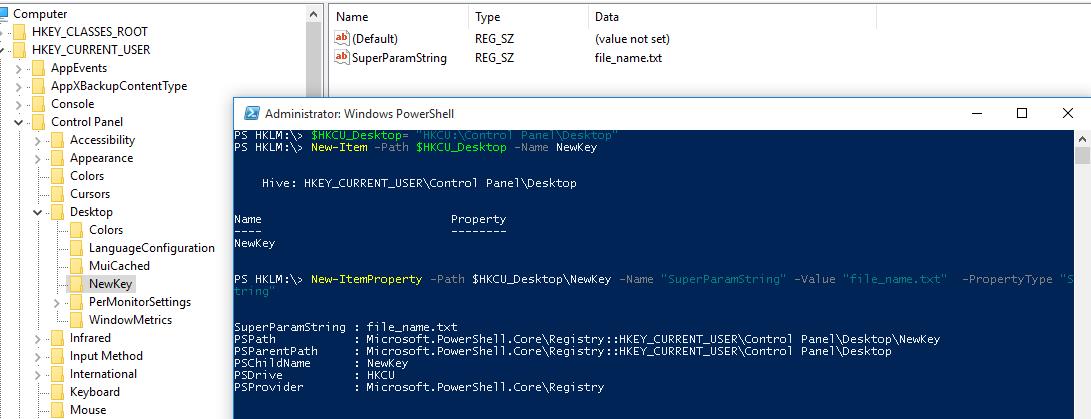
To create a new registry key, use the New-Item command. Let’s create a new key with the name *NewKey*:

`$HKCU_Desktop= "HKCU:\Control Panel\Desktop"New-Item –Path $HKCU_Desktop –Name NewKey`

Now let’s create a new parameter in a new registry key. Suppose we need to create a new string parameter of type REG\_SZ named *SuperParamString* and value filetmp1.txt:

`New-ItemProperty -Path $HKCU_Desktop\NewKey -Name "SuperParamString" -Value ”filetmp1.txt”  -PropertyType "String"`

<div class="info_box" id="bkmrk-you-can-use-the-foll">You can use the following data types for registry parameters:</div><div class="info_box" id="bkmrk-string-%28reg_sz%29-expa">- String (REG\_SZ)
- ExpandString (REG\_EXPAND\_SZ)
- MultiString (REG\_MULTI\_SZ)
- Binary (REG\_BINARY)
- DWord (REG\_DWORD)
- Qword (REG\_QWORD)
- Unknown (unsupported registry data type)

</div>Make sure that the new key and parameter have appeared in the registry.

[![powershell create registry parameter](https://woshub.com/wp-content/uploads/2017/06/powershell-create-registry-parameter.jpg)](https://woshub.com/wp-content/uploads/2017/06/powershell-create-registry-parameter.jpg)
**How to check if a registry key exists?**

If you need to check if a specific registry key exists, use the **Test-Path** cmdlet:

`Test-Path 'HKCU:\Control Panel\Desktop\NewKey'`

The following PowerShell script will check if a specific registry value exists, and if not, create it.

`regkey='HKCU:\Control Panel\Desktop\NewKey'$regparam='testparameter'if (Get-ItemProperty -Path $regkey -Name $regparam -ErrorAction Ignore){ write-host 'The registry entry already exist' }else{ New-ItemProperty -Path $regkey -Name $regparam -Value ”woshub_test”  -PropertyType "String"  }`

Using the **Copy-Item** cmdlet, you can copy entries from one registry key to another:

`$source='HKLM:\SOFTWARE\7-zip\'$dest = 'HKLM:\SOFTWARE\backup'Copy-Item -Path $source -Destination $dest -Recurse`

If you want to copy everything, including subkeys, add the *–Recurse* switch.

## Deleting a Registry Key or Parameter

The **Remove-ItemProperty** command is used to remove a parameter in the registry key. Let’s remove the parameter SuperParamString created earlier:

`$HKCU_Desktop= "HKCU:\Control Panel\Desktop"Remove-ItemProperty –Path $HKCU_Desktop\NewKey –Name "SuperParamString"`

You can delete the entire registry key with all its contents:

`Remove-Item –Path $HKCU_Desktop\NewKey –Recurse`

<div class="info_box" id="bkmrk-note.%C2%A0%E2%80%93recurse-switc">**Note.** –Recurse switch indicates that all subkeys have to be removed recursively.</div>To remove all items in the reg key (but not the key itself):

`Remove-Item –Path $HKCU_Desktop\NewKey\* –Recurse`

## How to Rename a Registry Key or a Parameter?

You can rename the registry parameter with the command:

`Rename-ItemProperty –path ‘HKCU:\Control Panel\Desktop\NewKey’ –name "SuperParamString" –newname “OldParamString”`

In the same way, you can rename the registry key:

`Rename-Item -path 'HKCU:\Control Panel\Desktop\NewKey' OldKey`

## Search Registry for Keyword Using PowerShell

PowerShell allows you to search the registry. The next following searches the HKCU:\\Control Panel\\Desktop for parameters, whose names contain the \**dpi*\* key.

`$Path = (Get-ItemProperty ‘HKCU:\Control Panel\Desktop’)$Path.PSObject.Properties | ForEach-Object {If($_.Name -like '*dpi*'){Write-Host $_.Name ' = ' $_.Value}}`

To find a registry key with a specific name:

`Get-ChildItem -path HKLM:\ -recurse -ErrorAction SilentlyContinue | Where-Object {$_.Name -like "*woshub*"}`

## Setting Registry Key Permissions with PowerShell

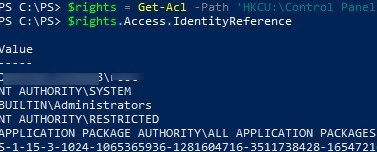
You can get the current registry key permissions using the Get-ACL cmdlet (the [Get-ACL cmdlet also allows you to manage NTFS permissions on files and folders](https://woshub.com/manage-ntfs-permissions-powershell/)).

`$rights = Get-Acl -Path 'HKCU:\Control Panel\Desktop\NewKey'$rights.Access.IdentityReference`

[![get registry key permissions with powershell](https://woshub.com/wp-content/uploads/2017/06/get-registry-key-permissions-with-powershell.jpg)](https://woshub.com/wp-content/uploads/2017/06/get-registry-key-permissions-with-powershell.jpg)
In the following example, we will modify the ACL in this registry key to grant write access to the built-in Users group.

Get current permissions:

`$rights = Get-Acl -Path 'HKCU:\Control Panel\Desktop\NewKey'`

Specify the user or group you want to grant access to:

`$idRef = [System.Security.Principal.NTAccount]"BuiltIn\Users"`

Select access level:

`$regRights = [System.Security.AccessControl.RegistryRights]::WriteKey`  
Set permissions inheritance settings :

`$inhFlags = [System.Security.AccessControl.InheritanceFlags]::None$prFlags = [System.Security.AccessControl.PropagationFlags]::None`

Access type (Allow/Deny):

`$acType = [System.Security.AccessControl.AccessControlType]::Allow`  
Create an access rule:

`$rule = New-Object System.Security.AccessControl.RegistryAccessRule ($idRef, $regRights, $inhFlags, $prFlags, $acType)`

Add a new rule to the current ACL:

`$rights.AddAccessRule($rule)`

Apply new permissions to the registry key:

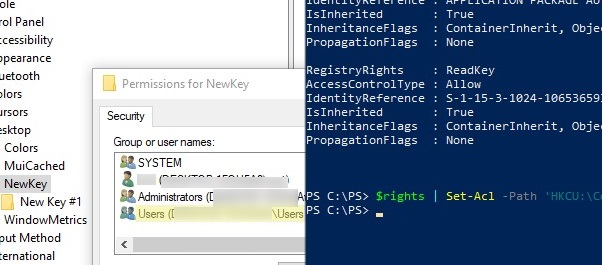
`$rights | Set-Acl -Path 'HKCU:\Control Panel\Desktop\NewKey'`

Make sure the new group appears in the ACL of the registry key.

[![change registry key permissions with powershell](https://woshub.com/wp-content/uploads/2017/06/set-registry-ermissions-powershell.jpg)](https://woshub.com/wp-content/uploads/2017/06/set-registry-ermissions-powershell.jpg)
## Getting a Registry Value from a Remote Computer via PowerShell

PowerShell allows you to access the registry of a remote computer. You can connect to a remote computer either using WinRM ([Invoke-Command](https://woshub.com/invoke-command-run-powershell-scripts-remotely/) or [Enter-PSSession](https://woshub.com/enter-pssession-remote-command-shell/)). To get the value of a registry parameter from a remote computer:

`Invoke-Command –ComputerName srv-fs1 –ScriptBlock {Get-ItemProperty -Path 'HKLM:\System\Setup' -Name WorkingDirectory}`

Or using a remote registry connection (the RemoteRegistry service must be enabled)

`$Server = "lon-fs1"$Reg = [Microsoft.Win32.RegistryKey]::OpenRemoteBaseKey('LocalMachine', $Server)$RegKey= $Reg.OpenSubKey("System\Setup")$RegValue = $RegKey.GetValue("WorkingDirectory")`

# PST Mailbox Import Export

<span class="TextRun SCXO227641740 BCX0" data-contrast="auto" lang="EN-US" xml:lang="EN-US"><span class="NormalTextRun SCXO227641740 BCX0">Exchange 2016:</span></span><span class="EOP SCXO227641740 BCX0"> </span>

<span class="TextRun SCXO227641740 BCX0" data-contrast="auto" lang="EN-US" xml:lang="EN-US"><span class="NormalTextRun SCXO227641740 BCX0">Add-PSSnapin Microsoft.Exchange.Management.PowerShell.SnapIn</span></span><span class="EOP SCXO227641740 BCX0"> </span>

<span class="TextRun SCXO227641740 BCX0" data-contrast="auto" lang="EN-US" xml:lang="EN-US"><span class="NormalTextRun SCXO227641740 BCX0">foreach ($Mailbox in (Get-Mailbox)) {New-MailboxExportRequest -Mailbox "$Mailbox" -FilePath "</span></span>[<span class="TextRun SCXO227641740 BCX0" data-contrast="auto" lang="EN-US" xml:lang="EN-US"><span class="NormalTextRun SCXO227641740 BCX0">\\\\ACS-01-VSRV49\\Export\\$($Mailbox.Alias).pst</span></span>](file://acs-01-vsrv49/Export/%24(%24Mailbox.Alias).pst)<span class="TextRun SCXO227641740 BCX0" data-contrast="auto" lang="EN-US" xml:lang="EN-US"><span class="NormalTextRun SCXO227641740 BCX0">"}</span></span><span class="EOP SCXO227641740 BCX0"> </span>

<span class="EOP SCXO227641740 BCX0"> </span>

<span class="EOP SCXO227641740 BCX0"> </span>

<span class="EOP SCXO227641740 BCX0"> </span>

<span class="TextRun SCXO227641740 BCX0" data-contrast="auto" lang="EN-US" xml:lang="EN-US"><span class="NormalTextRun SCXO227641740 BCX0">Exchange 2013+ : Add-PSSnapin Microsoft.Exchange.Management.PowerShell.SnapIn; </span></span><span class="EOP SCXO227641740 BCX0"> </span>

<span class="EOP SCXO227641740 BCX0"> </span>

<span class="TextRun SCXO227641740 BCX0" data-contrast="auto" lang="EN-US" xml:lang="EN-US"><span class="NormalTextRun SCXO227641740 BCX0">New-MailboxImportRequest </span></span><span class="TextRun SCXO227641740 BCX0" data-contrast="auto" lang="EN-US" xml:lang="EN-US"><span class="NormalTextRun SCXO227641740 BCX0">–</span></span><span class="TextRun SCXO227641740 BCX0" data-contrast="auto" lang="EN-US" xml:lang="EN-US"><span class="NormalTextRun SCXO227641740 BCX0">Mailbox Username </span></span><span class="TextRun SCXO227641740 BCX0" data-contrast="auto" lang="EN-US" xml:lang="EN-US"><span class="NormalTextRun SCXO227641740 BCX0">–</span></span><span class="TextRun SCXO227641740 BCX0" data-contrast="auto" lang="EN-US" xml:lang="EN-US"><span class="NormalTextRun SCXO227641740 BCX0">FilePath </span></span>[<span class="TextRun SCXO227641740 BCX0" data-contrast="auto" lang="EN-US" xml:lang="EN-US"><span class="NormalTextRun SCXO227641740 BCX0">\\\\unc\\share\\Filename.pst</span></span>](file://unc/share/Filename.pst)<span class="EOP SCXO227641740 BCX0"> </span>

<span class="TextRun SCXO227641740 BCX0" data-contrast="auto" lang="EN-US" xml:lang="EN-US"><span class="NormalTextRun SCXO227641740 BCX0"> </span></span><span class="EOP SCXO227641740 BCX0"> </span>

<span class="EOP SCXO227641740 BCX0"> </span>

<span class="TextRun SCXO227641740 BCX0" data-contrast="none" lang="EN-US" xml:lang="EN-US"><span class="NormalTextRun SCXO227641740 BCX0">New-MailboxExportRequest </span></span><span class="TextRun SCXO227641740 BCX0" data-contrast="none" lang="EN-US" xml:lang="EN-US"><span class="NormalTextRun SCXO227641740 BCX0">–</span></span><span class="TextRun SCXO227641740 BCX0" data-contrast="none" lang="EN-US" xml:lang="EN-US"><span class="NormalTextRun SCXO227641740 BCX0">Mailbox J.Wesselius </span></span><span class="TextRun SCXO227641740 BCX0" data-contrast="none" lang="EN-US" xml:lang="EN-US"><span class="NormalTextRun SCXO227641740 BCX0">–</span></span><span class="TextRun SCXO227641740 BCX0" data-contrast="none" lang="EN-US" xml:lang="EN-US"><span class="NormalTextRun SCXO227641740 BCX0">FilePath </span></span>[<span class="TextRun SCXO227641740 BCX0" data-contrast="auto" lang="EN-US" xml:lang="EN-US"><span class="NormalTextRun SCXO227641740 BCX0">\\\\2010AD02\\PST-Files\\J.Wesselius.pst</span></span>](file://2010ad02/PST-Files/J.Wesselius.pst)<span class="EOP SCXO227641740 BCX0"> </span>

<span class="EOP SCXO227641740 BCX0"> </span>

<span class="EOP SCXO227641740 BCX0"> </span>

<span class="TextRun SCXO227641740 BCX0" data-contrast="auto" lang="EN-US" xml:lang="EN-US"><span class="NormalTextRun SCXO227641740 BCX0">New-MailboxExportRequest -Mailbox "Chelsea Tackett" -FilePath </span></span>[<span class="TextRun SCXO227641740 BCX0" data-contrast="auto" lang="EN-US" xml:lang="EN-US"><span class="NormalTextRun SCXO227641740 BCX0">\\\\rhsc-00-VSRV20\\Litigation20180814\\Chelseatackett.pst</span></span>](file://rhsc-00-vsrv20/Litigation20180814/Chelseatackett.pst)<span class="EOP SCXO227641740 BCX0"> </span>

<span class="TextRun SCXO227641740 BCX0" data-contrast="auto" lang="EN-US" xml:lang="EN-US"><span class="NormalTextRun SCXO227641740 BCX0">New-MailboxExportRequest -Mailbox "Mike Klug" -FilePath </span></span>[<span class="TextRun SCXO227641740 BCX0" data-contrast="auto" lang="EN-US" xml:lang="EN-US"><span class="NormalTextRun SCXO227641740 BCX0">\\\\rhsc-00-VSRV20\\Litigation20180814\\MikeKlug.pst</span></span>](file://rhsc-00-vsrv20/Litigation20180814/MikeKlug.pst)<span class="EOP SCXO227641740 BCX0"> </span>

<span class="TextRun SCXO227641740 BCX0" data-contrast="auto" lang="EN-US" xml:lang="EN-US"><span class="NormalTextRun SCXO227641740 BCX0">New-MailboxExportRequest -Mailbox "Liz Larner" -FilePath </span></span>[<span class="TextRun SCXO227641740 BCX0" data-contrast="auto" lang="EN-US" xml:lang="EN-US"><span class="NormalTextRun SCXO227641740 BCX0">\\\\rhsc-00-VSRV20\\Litigation20180814\\LizLarner.pst</span></span>](file://rhsc-00-vsrv20/Litigation20180814/LizLarner.pst)<span class="EOP SCXO227641740 BCX0"> </span>

<span class="TextRun SCXO227641740 BCX0" data-contrast="auto" lang="EN-US" xml:lang="EN-US"><span class="NormalTextRun SCXO227641740 BCX0">New-MailboxExportRequest -Mailbox "Julie Overbeck" -FilePath </span></span>[<span class="TextRun SCXO227641740 BCX0" data-contrast="auto" lang="EN-US" xml:lang="EN-US"><span class="NormalTextRun SCXO227641740 BCX0">\\\\rhsc-00-VSRV20\\Litigation20180814\\JulieOverbeck.pst</span></span>](file://rhsc-00-vsrv20/Litigation20180814/JulieOverbeck.pst)<span class="EOP SCXO227641740 BCX0"> </span>

<span class="TextRun SCXO227641740 BCX0" data-contrast="auto" lang="EN-US" xml:lang="EN-US"><span class="NormalTextRun SCXO227641740 BCX0">New-MailboxExportRequest -Mailbox "John Overbeck" -FilePath </span></span>[<span class="TextRun SCXO227641740 BCX0" data-contrast="auto" lang="EN-US" xml:lang="EN-US"><span class="NormalTextRun SCXO227641740 BCX0">\\\\rhsc-00-VSRV20\\Litigation20180814\\JohnOverbeck.pst</span></span>](file://rhsc-00-vsrv20/Litigation20180814/JohnOverbeck.pst)<span class="EOP SCXO227641740 BCX0"> </span>

<span class="TextRun SCXO227641740 BCX0" data-contrast="auto" lang="EN-US" xml:lang="EN-US"><span class="NormalTextRun SCXO227641740 BCX0">New-MailboxExportRequest -Mailbox "Wendell Wiley" -FilePath </span></span>[<span class="TextRun SCXO227641740 BCX0" data-contrast="auto" lang="EN-US" xml:lang="EN-US"><span class="NormalTextRun SCXO227641740 BCX0">\\\\rhsc-00-VSRV20\\Litigation20180814\\WendellWiley.pst</span></span>](file://rhsc-00-vsrv20/Litigation20180814/WendellWiley.pst)<span class="EOP SCXO227641740 BCX0"> </span>

<span class="TextRun SCXO227641740 BCX0" data-contrast="auto" lang="EN-US" xml:lang="EN-US"><span class="NormalTextRun SCXO227641740 BCX0">New-MailboxExportRequest -Mailbox "Tim Bird" -FilePath </span></span>[<span class="TextRun SCXO227641740 BCX0" data-contrast="auto" lang="EN-US" xml:lang="EN-US"><span class="NormalTextRun SCXO227641740 BCX0">\\\\rhsc-00-VSRV20\\Litigation20180814\\TimBird.pst</span></span>](file://rhsc-00-vsrv20/Litigation20180814/TimBird.pst)<span class="EOP SCXO227641740 BCX0"> </span>

<span class="TextRun SCXO227641740 BCX0" data-contrast="auto" lang="EN-US" xml:lang="EN-US"><span class="NormalTextRun SCXO227641740 BCX0">New-MailboxExportRequest -Mailbox "Andy Sullivan" -FilePath </span></span>[<span class="TextRun SCXO227641740 BCX0" data-contrast="auto" lang="EN-US" xml:lang="EN-US"><span class="NormalTextRun SCXO227641740 BCX0">\\\\rhsc-00-VSRV20\\Litigation20180814\\AndySullivan.pst</span></span>](file://rhsc-00-vsrv20/Litigation20180814/AndySullivan.pst)<span class="EOP SCXO227641740 BCX0"> </span>

<span class="TextRun SCXO227641740 BCX0" data-contrast="auto" lang="EN-US" xml:lang="EN-US"><span class="NormalTextRun SCXO227641740 BCX0">New-MailboxExportRequest -Mailbox "Wade Jensen" -FilePath </span></span>[<span class="TextRun SCXO227641740 BCX0" data-contrast="auto" lang="EN-US" xml:lang="EN-US"><span class="NormalTextRun SCXO227641740 BCX0">\\\\rhsc-00-VSRV20\\Litigation20180814\\WadeJensen.pst</span></span>](file://rhsc-00-vsrv20/Litigation20180814/WadeJensen.pst)<span class="EOP SCXO227641740 BCX0"> </span>

<span class="TextRun SCXO227641740 BCX0" data-contrast="auto" lang="EN-US" xml:lang="EN-US"><span class="NormalTextRun SCXO227641740 BCX0">New-MailboxExportRequest -Mailbox "Roger Budreau" -FilePath </span></span>[<span class="TextRun SCXO227641740 BCX0" data-contrast="auto" lang="EN-US" xml:lang="EN-US"><span class="NormalTextRun SCXO227641740 BCX0">\\\\rhsc-00-VSRV20\\Litigation20180814\\RogerBudreau.pst</span></span>](file://rhsc-00-vsrv20/Litigation20180814/RogerBudreau.pst)<span class="EOP SCXO227641740 BCX0"> </span>

<span class="EOP SCXO227641740 BCX0"> </span>

<span class="EOP SCXO227641740 BCX0"> </span>

<span class="TextRun SCXO227641740 BCX0" data-contrast="auto" lang="EN-US" xml:lang="EN-US"><span class="NormalTextRun SCXO227641740 BCX0">Export all disabled accounts with one command:</span></span><span class="EOP SCXO227641740 BCX0"> </span>

<span class="EOP SCXO227641740 BCX0"> </span>

<span class="EOP SCXO227641740 BCX0"> </span>

<span class="EOP SCXO227641740 BCX0"> </span>

<span class="TextRun SCXO227641740 BCX0" data-contrast="auto" lang="EN-US" xml:lang="EN-US"><span class="NormalTextRun SCXO227641740 BCX0">$Export = Get-Mailbox</span></span><span class="EOP SCXO227641740 BCX0"> </span>

<span class="TextRun SCXO227641740 BCX0" data-contrast="auto" lang="EN-US" xml:lang="EN-US"><span class="NormalTextRun SCXO227641740 BCX0">$Export | ?{$\_.ExchangeUserAccountControl -eq 'AccountDisabled'} |%{$\_|New-MailboxExportRequest -FilePath </span></span>[<span class="TextRun SCXO227641740 BCX0" data-contrast="auto" lang="EN-US" xml:lang="EN-US"><span class="NormalTextRun SCXO227641740 BCX0">\\\\RHSC-00-srv12\\test\\$($\_.alias).pst</span></span>](file://rhsc-00-srv12/test/%24(%24_.alias).pst)<span class="TextRun SCXO227641740 BCX0" data-contrast="auto" lang="EN-US" xml:lang="EN-US"><span class="NormalTextRun SCXO227641740 BCX0">}</span></span><span class="EOP SCXO227641740 BCX0"> </span>

<span class="EOP SCXO227641740 BCX0"> </span>

<span class="EOP SCXO227641740 BCX0"> </span>

<span class="TextRun SCXO227641740 BCX0" data-contrast="auto" lang="EN-US" xml:lang="EN-US"><span class="NormalTextRun SCXO227641740 BCX0">$Export = Get-Mailbox</span></span><span class="EOP SCXO227641740 BCX0"> </span>

<span class="TextRun SCXO227641740 BCX0" data-contrast="auto" lang="EN-US" xml:lang="EN-US"><span class="NormalTextRun SCXO227641740 BCX0">$Export | ?{$\_.ExchangeUserAccountControl -eq 'AccountDisabled'} |%{$\_|New-MailboxExportRequest -FilePath </span></span>[<span class="TextRun SCXO227641740 BCX0" data-contrast="auto" lang="EN-US" xml:lang="EN-US"><span class="NormalTextRun SCXO227641740 BCX0">\\\\rhsc-00-vsrv17\\Backup\\$($\_.alias).pst</span></span>](file://rhsc-00-vsrv17/Backup/%24(%24_.alias).pst)<span class="TextRun SCXO227641740 BCX0" data-contrast="auto" lang="EN-US" xml:lang="EN-US"><span class="NormalTextRun SCXO227641740 BCX0">}</span></span><span class="EOP SCXO227641740 BCX0"> </span>

<span class="EOP SCXO227641740 BCX0"> </span>

<span class="EOP SCXO227641740 BCX0"> </span>

<span class="EOP SCXO227641740 BCX0"> </span>

<span class="TextRun SCXO227641740 BCX0" data-contrast="auto" lang="EN-US" xml:lang="EN-US"><span class="NormalTextRun SCXO227641740 BCX0">List of Disabled accounts sorted by mailbox size:</span></span><span class="EOP SCXO227641740 BCX0"> </span>

<span class="TextRun SCXO227641740 BCX0" data-contrast="auto" lang="EN-US" xml:lang="EN-US"><span class="NormalTextRun SCXO227641740 BCX0">$Export = Get-Mailbox</span></span><span class="EOP SCXO227641740 BCX0"> </span>

<span class="TextRun SCXO227641740 BCX0" data-contrast="auto" lang="EN-US" xml:lang="EN-US"><span class="NormalTextRun SCXO227641740 BCX0">$Export | ?{$\_.ExchangeUserAccountControl -eq 'AccountDisabled'} | get-mailboxstatistics | sort-object totalitemsize </span></span><span class="TextRun SCXO227641740 BCX0" data-contrast="auto" lang="EN-US" xml:lang="EN-US"><span class="NormalTextRun SCXO227641740 BCX0">–descending | ft displayname,totalitemsize</span></span><span class="EOP SCXO227641740 BCX0"> </span>

<span class="EOP SCXO227641740 BCX0"> </span>

<span class="TextRun SCXO227641740 BCX0" data-contrast="auto" lang="EN-US" xml:lang="EN-US"><span class="NormalTextRun SCXO227641740 BCX0">All mailboxes into txt file:</span></span><span class="EOP SCXO227641740 BCX0"> </span>

<span class="TextRun SCXO227641740 BCX0" data-contrast="auto" lang="EN-US" xml:lang="EN-US"><span class="NormalTextRun SCXO227641740 BCX0">$Export = Get-Mailbox</span></span><span class="EOP SCXO227641740 BCX0"> </span>

<span class="TextRun SCXO227641740 BCX0" data-contrast="auto" lang="EN-US" xml:lang="EN-US"><span class="NormalTextRun SCXO227641740 BCX0">$Export | get-mailboxstatistics | sort-object totalitemsize </span></span><span class="TextRun SCXO227641740 BCX0" data-contrast="auto" lang="EN-US" xml:lang="EN-US"><span class="NormalTextRun SCXO227641740 BCX0">–descending | ft displayname,totalitemsize</span></span><span class="TextRun SCXO227641740 BCX0" data-contrast="auto" lang="EN-US" xml:lang="EN-US"><span class="NormalTextRun SCXO227641740 BCX0"> &gt; C:\\Accent\\mailboxsize.txt</span></span><span class="EOP SCXO227641740 BCX0"> </span>

<span class="EOP SCXO227641740 BCX0"> </span>

<span class="EOP SCXO227641740 BCX0"> </span>

<span class="TextRun SCXO227641740 BCX0" data-contrast="auto" lang="EN-US" xml:lang="EN-US"><span class="NormalTextRun SCXO227641740 BCX0">$Export = Get-Mailbox</span></span><span class="EOP SCXO227641740 BCX0"> </span>

<span class="TextRun SCXO227641740 BCX0" data-contrast="auto" lang="EN-US" xml:lang="EN-US"><span class="NormalTextRun SCXO227641740 BCX0">$Export | get-mailboxstatistics | sort-object totalitemsize –descending | Select-Object displayname,totalitemsize | Export-Csv C:\\Accent\\mailboxsize.csv -NoTypeInformation</span></span><span class="EOP SCXO227641740 BCX0"> </span>

<span class="EOP SCXO227641740 BCX0"> </span>

<span class="EOP SCXO227641740 BCX0"> </span>

<span class="EOP SCXO227641740 BCX0"> </span>

<span class="TextRun SCXO227641740 BCX0" data-contrast="none" lang="EN-US" xml:lang="EN-US"><span class="NormalTextRun SCXO227641740 BCX0">Pasted from &lt;</span></span>[<span class="TextRun SCXO227641740 BCX0" data-contrast="auto" lang="EN-US" xml:lang="EN-US"><span class="NormalTextRun SCXO227641740 BCX0">https://www.simple-talk.com/sysadmin/exchange/importing-psts-with-powershell-in-exchange-2010-sp1/</span></span>](https://www.simple-talk.com/sysadmin/exchange/importing-psts-with-powershell-in-exchange-2010-sp1/)<span class="TextRun SCXO227641740 BCX0" data-contrast="none" lang="EN-US" xml:lang="EN-US"><span class="NormalTextRun SCXO227641740 BCX0">&gt; </span></span><span class="EOP SCXO227641740 BCX0"> </span>

<span class="EOP SCXO227641740 BCX0"> </span>

<span class="TextRun SCXO227641740 BCX0" data-contrast="auto" lang="EN-US" xml:lang="EN-US"><span class="NormalTextRun SCXO227641740 BCX0">Get all mailboxes to a specific DB sorted by size</span></span><span class="EOP SCXO227641740 BCX0"> </span>

<span class="TextRun SCXO227641740 BCX0" data-contrast="auto" lang="EN-US" xml:lang="EN-US"><span class="NormalTextRun SCXO227641740 BCX0">Get-Mailbox -database "DB13" | Get-MailboxStatistics |Sort-Object totalitemsize -descending | ft displayname,totalitemsize,database &gt; C:\\Accent\\mailboxsizeDB13.txt </span></span><span class="EOP SCXO227641740 BCX0"> </span>

<span class="TextRun SCXO227641740 BCX0" data-contrast="auto" lang="EN-US" xml:lang="EN-US"><span class="NormalTextRun SCXO227641740 BCX0">Get-Mailbox -database "DB16" | Get-MailboxStatistics |Sort-Object totalitemsize -descending | ft displayname,totalitemsize,database &gt; C:\\Accent\\mailboxsizeDB16.txt </span></span><span class="EOP SCXO227641740 BCX0"> </span>

<span class="TextRun SCXO227641740 BCX0" data-contrast="auto" lang="EN-US" xml:lang="EN-US"><span class="NormalTextRun SCXO227641740 BCX0">Get-Mailbox -database "DB15" | Get-MailboxStatistics |Sort-Object totalitemsize -descending | ft displayname,totalitemsize,database &gt; C:\\Accent\\mailboxsizeDB15.txt </span></span><span class="EOP SCXO227641740 BCX0"> </span>

<span class="TextRun SCXO227641740 BCX0" data-contrast="auto" lang="EN-US" xml:lang="EN-US"><span class="NormalTextRun SCXO227641740 BCX0">Get-Mailbox -database "DB17" | Get-MailboxStatistics |Sort-Object totalitemsize -descending | ft displayname,totalitemsize,database &gt; C:\\Accent\\mailboxsizeDB17.txt </span></span><span class="EOP SCXO227641740 BCX0"> </span>

<span class="TextRun SCXO227641740 BCX0" data-contrast="auto" lang="EN-US" xml:lang="EN-US"><span class="NormalTextRun SCXO227641740 BCX0">Get-Mailbox -database "DB19" | Get-MailboxStatistics |Sort-Object totalitemsize -descending | ft displayname,totalitemsize,database &gt; C:\\Accent\\mailboxsizeDB19.txt </span></span><span class="EOP SCXO227641740 BCX0"> </span>

<span class="EOP SCXO227641740 BCX0"> </span>

<span class="TextRun SCXO227641740 BCX0" data-contrast="auto" lang="EN-US" xml:lang="EN-US"><span class="NormalTextRun SCXO227641740 BCX0">Get-Mailbox -database "DB13" | Get-MailboxStatistics |Sort-Object displayname -descending | ft displayname,database &gt; C:\\Accent\\mailboxsizeDB13.txt </span></span><span class="EOP SCXO227641740 BCX0"> </span>

<span class="EOP SCXO227641740 BCX0"> </span>

<span class="EOP SCXO227641740 BCX0"> </span>

<span class="TextRun SCXO227641740 BCX0" data-contrast="auto" lang="EN-US" xml:lang="EN-US"><span class="NormalTextRun SCXO227641740 BCX0">Get DB path and log path</span></span><span class="EOP SCXO227641740 BCX0"> </span>

<span class="TextRun SCXO227641740 BCX0" data-contrast="auto" lang="EN-US" xml:lang="EN-US"><span class="NormalTextRun SCXO227641740 BCX0">Get-MailboxDatabase \* | FL Name,\*Path\*</span></span><span class="EOP SCXO227641740 BCX0"> </span>

<span class="EOP SCXO227641740 BCX0"> </span>

<span class="EOP SCXO227641740 BCX0"> </span>

<span class="TextRun SCXO227641740 BCX0" data-contrast="auto" lang="EN-US" xml:lang="EN-US"><span class="NormalTextRun SCXO227641740 BCX0">Move DB path for logs</span></span><span class="EOP SCXO227641740 BCX0"> </span>

<span class="TextRun SCXO227641740 BCX0" data-contrast="auto" lang="EN-US" xml:lang="EN-US"><span class="NormalTextRun SCXO227641740 BCX0">Move-Databasepath "DB17" </span></span><span class="TextRun SCXO227641740 BCX0" data-contrast="auto" lang="EN-US" xml:lang="EN-US"><span class="NormalTextRun SCXO227641740 BCX0">–EdbFilepath "E:\\MailboxDatabase\\DB17.edb" –LogFolderpath "F:\\MailboxLogs\\DB17"</span></span><span class="EOP SCXO227641740 BCX0"> </span>

<span class="TextRun SCXO227641740 BCX0" data-contrast="auto" lang="EN-US" xml:lang="EN-US"><span class="NormalTextRun SCXO227641740 BCX0">Move-Databasepath "DB15" </span></span><span class="TextRun SCXO227641740 BCX0" data-contrast="auto" lang="EN-US" xml:lang="EN-US"><span class="NormalTextRun SCXO227641740 BCX0">–EdbFilepath "E:\\MailboxDatabase\\DB1</span></span><span class="TextRun SCXO227641740 BCX0" data-contrast="auto" lang="EN-US" xml:lang="EN-US"><span class="NormalTextRun SCXO227641740 BCX0">5</span></span><span class="TextRun SCXO227641740 BCX0" data-contrast="auto" lang="EN-US" xml:lang="EN-US"><span class="NormalTextRun SCXO227641740 BCX0">.edb" –LogFolderpath "F:\\MailboxLogs\\DB1</span></span><span class="TextRun SCXO227641740 BCX0" data-contrast="auto" lang="EN-US" xml:lang="EN-US"><span class="NormalTextRun SCXO227641740 BCX0">5</span></span><span class="TextRun SCXO227641740 BCX0" data-contrast="auto" lang="EN-US" xml:lang="EN-US"><span class="NormalTextRun SCXO227641740 BCX0">"</span></span><span class="EOP SCXO227641740 BCX0"> </span>

<span class="TextRun SCXO227641740 BCX0" data-contrast="auto" lang="EN-US" xml:lang="EN-US"><span class="NormalTextRun SCXO227641740 BCX0">Move-Databasepath "DB16" </span></span><span class="TextRun SCXO227641740 BCX0" data-contrast="auto" lang="EN-US" xml:lang="EN-US"><span class="NormalTextRun SCXO227641740 BCX0">–EdbFilepath "E:\\MailboxDatabase\\DB1</span></span><span class="TextRun SCXO227641740 BCX0" data-contrast="auto" lang="EN-US" xml:lang="EN-US"><span class="NormalTextRun SCXO227641740 BCX0">6</span></span><span class="TextRun SCXO227641740 BCX0" data-contrast="auto" lang="EN-US" xml:lang="EN-US"><span class="NormalTextRun SCXO227641740 BCX0">.edb" –LogFolderpath "F:\\MailboxLogs\\DB1</span></span><span class="TextRun SCXO227641740 BCX0" data-contrast="auto" lang="EN-US" xml:lang="EN-US"><span class="NormalTextRun SCXO227641740 BCX0">6</span></span><span class="TextRun SCXO227641740 BCX0" data-contrast="auto" lang="EN-US" xml:lang="EN-US"><span class="NormalTextRun SCXO227641740 BCX0">"</span></span><span class="TextRun SCXO227641740 BCX0" data-contrast="auto" lang="EN-US" xml:lang="EN-US"><span class="NormalTextRun SCXO227641740 BCX0"> </span></span><span class="EOP SCXO227641740 BCX0"> </span>

<span class="TextRun SCXO227641740 BCX0" data-contrast="auto" lang="EN-US" xml:lang="EN-US"><span class="NormalTextRun SCXO227641740 BCX0">Move-Databasepath "DB19" </span></span><span class="TextRun SCXO227641740 BCX0" data-contrast="auto" lang="EN-US" xml:lang="EN-US"><span class="NormalTextRun SCXO227641740 BCX0">–EdbFilepath "E:\\MailboxDatabase\\DB1</span></span><span class="TextRun SCXO227641740 BCX0" data-contrast="auto" lang="EN-US" xml:lang="EN-US"><span class="NormalTextRun SCXO227641740 BCX0">9</span></span><span class="TextRun SCXO227641740 BCX0" data-contrast="auto" lang="EN-US" xml:lang="EN-US"><span class="NormalTextRun SCXO227641740 BCX0">.edb" –LogFolderpath "F:\\MailboxLogs\\DB1</span></span><span class="TextRun SCXO227641740 BCX0" data-contrast="auto" lang="EN-US" xml:lang="EN-US"><span class="NormalTextRun SCXO227641740 BCX0">9</span></span><span class="TextRun SCXO227641740 BCX0" data-contrast="auto" lang="EN-US" xml:lang="EN-US"><span class="NormalTextRun SCXO227641740 BCX0">"</span></span><span class="EOP SCXO227641740 BCX0"> </span>

<span class="EOP SCXO227641740 BCX0"> </span>

<span class="TextRun SCXO227641740 BCX0" data-contrast="auto" lang="EN-US" xml:lang="EN-US"><span class="NormalTextRun SCXO227641740 BCX0">Move-Databasepath "DB16" </span></span><span class="TextRun SCXO227641740 BCX0" data-contrast="auto" lang="EN-US" xml:lang="EN-US"><span class="NormalTextRun SCXO227641740 BCX0">–EdbFilepath "</span></span><span class="TextRun SCXO227641740 BCX0" data-contrast="auto" lang="EN-US" xml:lang="EN-US"><span class="NormalTextRun SCXO227641740 BCX0">G</span></span><span class="TextRun SCXO227641740 BCX0" data-contrast="auto" lang="EN-US" xml:lang="EN-US"><span class="NormalTextRun SCXO227641740 BCX0">:\\MailboxDatabase\\DB1</span></span><span class="TextRun SCXO227641740 BCX0" data-contrast="auto" lang="EN-US" xml:lang="EN-US"><span class="NormalTextRun SCXO227641740 BCX0">6</span></span><span class="TextRun SCXO227641740 BCX0" data-contrast="auto" lang="EN-US" xml:lang="EN-US"><span class="NormalTextRun SCXO227641740 BCX0">.edb" –LogFolderpath "F:\\MailboxLogs\\DB1</span></span><span class="TextRun SCXO227641740 BCX0" data-contrast="auto" lang="EN-US" xml:lang="EN-US"><span class="NormalTextRun SCXO227641740 BCX0">6</span></span><span class="TextRun SCXO227641740 BCX0" data-contrast="auto" lang="EN-US" xml:lang="EN-US"><span class="NormalTextRun SCXO227641740 BCX0">"</span></span><span class="TextRun SCXO227641740 BCX0" data-contrast="auto" lang="EN-US" xml:lang="EN-US"><span class="NormalTextRun SCXO227641740 BCX0"> </span></span><span class="EOP SCXO227641740 BCX0"> </span>

<span class="TextRun SCXO227641740 BCX0" data-contrast="auto" lang="EN-US" xml:lang="EN-US"><span class="NormalTextRun SCXO227641740 BCX0">Move-Databasepath "DB20" </span></span><span class="TextRun SCXO227641740 BCX0" data-contrast="auto" lang="EN-US" xml:lang="EN-US"><span class="NormalTextRun SCXO227641740 BCX0">–EdbFilepath "</span></span><span class="TextRun SCXO227641740 BCX0" data-contrast="auto" lang="EN-US" xml:lang="EN-US"><span class="NormalTextRun SCXO227641740 BCX0">G</span></span><span class="TextRun SCXO227641740 BCX0" data-contrast="auto" lang="EN-US" xml:lang="EN-US"><span class="NormalTextRun SCXO227641740 BCX0">:\\MailboxDatabase\\DB</span></span><span class="TextRun SCXO227641740 BCX0" data-contrast="auto" lang="EN-US" xml:lang="EN-US"><span class="NormalTextRun SCXO227641740 BCX0">20</span></span><span class="TextRun SCXO227641740 BCX0" data-contrast="auto" lang="EN-US" xml:lang="EN-US"><span class="NormalTextRun SCXO227641740 BCX0">.edb" –LogFolderpath "F:\\MailboxLogs\\DB</span></span><span class="TextRun SCXO227641740 BCX0" data-contrast="auto" lang="EN-US" xml:lang="EN-US"><span class="NormalTextRun SCXO227641740 BCX0">20</span></span><span class="TextRun SCXO227641740 BCX0" data-contrast="auto" lang="EN-US" xml:lang="EN-US"><span class="NormalTextRun SCXO227641740 BCX0">"</span></span><span class="TextRun SCXO227641740 BCX0" data-contrast="auto" lang="EN-US" xml:lang="EN-US"><span class="NormalTextRun SCXO227641740 BCX0"> </span></span><span class="EOP SCXO227641740 BCX0"> </span>

<span class="EOP SCXO227641740 BCX0"> </span>

<span class="TextRun SCXO227641740 BCX0" data-contrast="auto" lang="EN-US" xml:lang="EN-US"><span class="NormalTextRun SCXO227641740 BCX0">Create new DB</span></span><span class="EOP SCXO227641740 BCX0"> </span>

<span class="TextRun SCXO227641740 BCX0" data-contrast="auto" lang="EN-US" xml:lang="EN-US"><span class="NormalTextRun SCXO227641740 BCX0">New-MailboxDatabase -Name "DB20" -EdbFilePath F:\\</span></span><span class="TextRun SCXO227641740 BCX0" data-contrast="auto" lang="EN-US" xml:lang="EN-US"><span class="NormalTextRun SCXO227641740 BCX0">MailboxDatabase\\DB</span></span><span class="TextRun SCXO227641740 BCX0" data-contrast="auto" lang="EN-US" xml:lang="EN-US"><span class="NormalTextRun SCXO227641740 BCX0">20</span></span><span class="TextRun SCXO227641740 BCX0" data-contrast="auto" lang="EN-US" xml:lang="EN-US"><span class="NormalTextRun SCXO227641740 BCX0">.edb</span></span><span class="TextRun SCXO227641740 BCX0" data-contrast="auto" lang="EN-US" xml:lang="EN-US"><span class="NormalTextRun SCXO227641740 BCX0"> </span></span><span class="TextRun SCXO227641740 BCX0" data-contrast="auto" lang="EN-US" xml:lang="EN-US"><span class="NormalTextRun SCXO227641740 BCX0">–LogFolderpath "F:\\MailboxLogs\\DB</span></span><span class="TextRun SCXO227641740 BCX0" data-contrast="auto" lang="EN-US" xml:lang="EN-US"><span class="NormalTextRun SCXO227641740 BCX0">20</span></span><span class="TextRun SCXO227641740 BCX0" data-contrast="auto" lang="EN-US" xml:lang="EN-US"><span class="NormalTextRun SCXO227641740 BCX0">"</span></span><span class="TextRun SCXO227641740 BCX0" data-contrast="auto" lang="EN-US" xml:lang="EN-US"><span class="NormalTextRun SCXO227641740 BCX0"> </span></span><span class="EOP SCXO227641740 BCX0"> </span>

<span class="EOP SCXO227641740 BCX0"> </span>

<span class="EOP SCXO227641740 BCX0"> </span>

<span class="EOP SCXO227641740 BCX0"> </span>

<span class="EOP SCXO227641740 BCX0"> </span>

<span class="TextRun SCXO227641740 BCX0" data-contrast="auto" lang="EN-US" xml:lang="EN-US"><span class="NormalTextRun SCXO227641740 BCX0">ID 'Whitespace' per DB (if defrag how much space would be gained)</span></span><span class="EOP SCXO227641740 BCX0"> </span>

<span class="TextRun Highlight SCXO227641740 BCX0" data-contrast="none" lang="EN-US" xml:lang="EN-US"><span class="NormalTextRun SCXO227641740 BCX0">Get-MailboxDatabase -Status | FT Name,DatabaseSize,AvailableNewMailboxSpace -Auto</span></span><span class="EOP SCXO227641740 BCX0"> </span>

<span class="EOP SCXO227641740 BCX0"> </span>

<span class="TextRun SCXO227641740 BCX0" data-contrast="none" lang="EN-US" xml:lang="EN-US"><span class="NormalTextRun SCXO227641740 BCX0">From &lt;</span></span>[<span class="TextRun SCXO227641740 BCX0" data-contrast="auto" lang="EN-US" xml:lang="EN-US"><span class="NormalTextRun SCXO227641740 BCX0">http://www.blackmanticore.com/b67b676d69591719d3e14f7e92ee7a07</span></span>](http://www.blackmanticore.com/b67b676d69591719d3e14f7e92ee7a07)<span class="TextRun SCXO227641740 BCX0" data-contrast="none" lang="EN-US" xml:lang="EN-US"><span class="NormalTextRun SCXO227641740 BCX0">&gt; </span></span><span class="EOP SCXO227641740 BCX0"> </span>

<span class="EOP SCXO227641740 BCX0"> </span>

<span class="EOP SCXO227641740 BCX0"> </span>

<span class="EOP SCXO227641740 BCX0"></span>

# Public Folders

<span class="TextRun SCXO192671102 BCX0" data-contrast="auto" lang="EN-US" xml:lang="EN-US"><span class="NormalTextRun SCXO192671102 BCX0">Remove Public Folders</span></span><span class="EOP SCXO192671102 BCX0"> </span>

<span class="EOP SCXO192671102 BCX0"> </span>

<span class="EOP SCXO192671102 BCX0"> </span>

<span class="TextRun SCXO192671102 BCX0" data-contrast="auto" lang="EN-US" xml:lang="EN-US"><span class="NormalTextRun SCXO192671102 BCX0">Get-PublicFolder -Server &lt;server containing the public folder database&gt; "\\" -Recurse -ResultSize:Unlimited | Remove-PublicFolder -Server &lt;server containing the public folder database&gt; -Recurse -ErrorAction:SilentlyContinue</span></span><span class="EOP SCXO192671102 BCX0"> </span>

<span class="EOP SCXO192671102 BCX0"> </span>

<span class="TextRun SCXO192671102 BCX0" data-contrast="none" lang="EN-US" xml:lang="EN-US"><span class="NormalTextRun SCXO192671102 BCX0">From &lt;</span></span>[<span class="TextRun SCXO192671102 BCX0" data-contrast="auto" lang="EN-US" xml:lang="EN-US"><span class="NormalTextRun SCXO192671102 BCX0">https://technet.microsoft.com/en-us/library/bb201664%28v=exchg.140%29.aspx?f=255&amp;MSPPError=-2147217396</span></span>](https://technet.microsoft.com/en-us/library/bb201664%28v=exchg.140%29.aspx?f=255&MSPPError=-2147217396)<span class="TextRun SCXO192671102 BCX0" data-contrast="none" lang="EN-US" xml:lang="EN-US"><span class="NormalTextRun SCXO192671102 BCX0">&gt; </span></span><span class="EOP SCXO192671102 BCX0"> </span>

<span class="EOP SCXO192671102 BCX0"> </span>

<span class="EOP SCXO192671102 BCX0"> </span>

<span class="EOP SCXO192671102 BCX0"> </span>

<span class="EOP SCXO192671102 BCX0"> </span>

<span class="TextRun SCXO192671102 BCX0" data-contrast="auto" lang="EN-US" xml:lang="EN-US"><span class="NormalTextRun SCXO192671102 BCX0">Get-PublicFolder -Server &lt;server containing the public folder database&gt; "\\Non\_Ipm\_Subtree" -Recurse -ResultSize:Unlimited | Remove-PublicFolder -Server &lt;server containing the public folder database&gt; -Recurse -ErrorAction:SilentlyContinue</span></span><span class="EOP SCXO192671102 BCX0"> </span>

<span class="EOP SCXO192671102 BCX0"> </span>

<span class="TextRun SCXO192671102 BCX0" data-contrast="none" lang="EN-US" xml:lang="EN-US"><span class="NormalTextRun SCXO192671102 BCX0">From &lt;</span></span>[<span class="TextRun SCXO192671102 BCX0" data-contrast="auto" lang="EN-US" xml:lang="EN-US"><span class="NormalTextRun SCXO192671102 BCX0">https://technet.microsoft.com/en-us/library/bb201664%28v=exchg.140%29.aspx?f=255&amp;MSPPError=-2147217396</span></span>](https://technet.microsoft.com/en-us/library/bb201664%28v=exchg.140%29.aspx?f=255&MSPPError=-2147217396)<span class="TextRun SCXO192671102 BCX0" data-contrast="none" lang="EN-US" xml:lang="EN-US"><span class="NormalTextRun SCXO192671102 BCX0">&gt; </span></span><span class="EOP SCXO192671102 BCX0"> </span>

<span class="EOP SCXO192671102 BCX0"> </span>

<span class="EOP SCXO192671102 BCX0"> </span>

<span class="EOP SCXO192671102 BCX0"> </span>

<span class="TextRun SCXO192671102 BCX0" data-contrast="auto" lang="EN-US" xml:lang="EN-US"><span class="NormalTextRun SCXO192671102 BCX0">Exchange 2010</span></span><span class="EOP SCXO192671102 BCX0"></span>

# Remove lingering snapshots

<span class="TextRun SCXO88932938 BCX0" data-contrast="auto" lang="EN-US" xml:lang="EN-US"><span class="NormalTextRun SCXO88932938 BCX0">Get-VMSnapshot -ComputerName "MyHyperVHost" -VMName "VMWithLingeringBackupCheckpoint"</span></span><span class="EOP SCXO88932938 BCX0"> </span>

<span class="EOP SCXO88932938 BCX0"> </span>

<span class="EOP SCXO88932938 BCX0"> </span>

<span class="EOP SCXO88932938 BCX0"> </span>

<span class="EOP SCXO88932938 BCX0"> </span>

<span class="TextRun SCXO88932938 BCX0" data-contrast="auto" lang="EN-US" xml:lang="EN-US"><span class="NormalTextRun SCXO88932938 BCX0">Get-VMSnapshot -ComputerName "MyHyperVHost" -VMName "VMWithLingeringBackupCheckpoint" | Remove-VMSnapsh</span></span>

# Remove old files from folder

<span class="TextRun SCXO131227939 BCX0" data-contrast="auto" lang="EN-US" xml:lang="EN-US"><span class="NormalTextRun SCXO131227939 BCX0">Get-ChildItem –Path “C:\\inetpub\\logs\\LogFiles” –Recurse -file | Where-Object CreationTime –lt (Get-Date).AddDays(-30) | Remove-Item -force</span></span><span class="EOP SCXO131227939 BCX0"></span>

# Remove spaces from files and folders

<span class="TextRun SCXO8981831 BCX0" data-contrast="auto" lang="EN-US" xml:lang="EN-US"><span class="NormalTextRun SCXO8981831 BCX0">$path = "Set path per location"</span></span><span class="EOP SCXO8981831 BCX0"> </span>

<span class="TextRun SCXO8981831 BCX0" data-contrast="auto" lang="EN-US" xml:lang="EN-US"><span class="NormalTextRun SCXO8981831 BCX0">Get-ChildItem $path -File -Recurse | Where-Object { $\_.Name.Contains(' ') } | Rename-Item -NewName { $\_.Name -replace ' ', '' }</span></span><span class="EOP SCXO8981831 BCX0"> </span>

<span class="EOP SCXO8981831 BCX0"> </span>

<span class="EOP SCXO8981831 BCX0"> </span>

<span class="TextRun SCXO8981831 BCX0" data-contrast="auto" lang="EN-US" xml:lang="EN-US"><span class="NormalTextRun SCXO8981831 BCX0">$folder = "set path per location"</span></span><span class="EOP SCXO8981831 BCX0"> </span>

<span class="TextRun SCXO8981831 BCX0" data-contrast="auto" lang="EN-US" xml:lang="EN-US"><span class="NormalTextRun SCXO8981831 BCX0">get-childItem $folder -Recurse -include '\* \*' | rename-item -newname { $\_.name -replace ' ','' }</span></span><span class="EOP SCXO8981831 BCX0"> </span>

<span class="EOP SCXO8981831 BCX0"></span>

# Safe Sender

<span class="TextRun SCXO160767056 BCX0" data-contrast="auto" lang="EN-US" xml:lang="EN-US"><span class="NormalTextRun SCXO160767056 BCX0">dsadd computer "cn=RHSC-33-LT03, OU=Mobile,OU=Workstation,OU=Belle Plaine,OU=RHSC,DC=RHSC,DC=local"</span></span><span class="EOP SCXO160767056 BCX0"> </span>

<span class="TextRun SCXO160767056 BCX0" data-contrast="auto" lang="EN-US" xml:lang="EN-US"><span class="NormalTextRun SCXO160767056 BCX0">dsadd computer "cn=RHSC-33-LT03, OU=Mobile,OU=Workstation,OU=Belle Plaine,OU=RHSC,DC=RHSC,DC=local"</span></span><span class="EOP SCXO160767056 BCX0"> </span>

<span class="TextRun SCXO160767056 BCX0" data-contrast="auto" lang="EN-US" xml:lang="EN-US"><span class="NormalTextRun SCXO160767056 BCX0">dsadd computer "cn=RHSC-33-LT04, OU=Mobile,OU=Workstation,OU=Belle Plaine,OU=RHSC,DC=RHSC,DC=local"</span></span><span class="EOP SCXO160767056 BCX0"> </span>

<span class="TextRun SCXO160767056 BCX0" data-contrast="auto" lang="EN-US" xml:lang="EN-US"><span class="NormalTextRun SCXO160767056 BCX0">dsadd computer "cn=RHSC-33-LT05, OU=Mobile,OU=Workstation,OU=Belle Plaine,OU=RHSC,DC=RHSC,DC=local"</span></span><span class="EOP SCXO160767056 BCX0"> </span>

<span class="TextRun SCXO160767056 BCX0" data-contrast="auto" lang="EN-US" xml:lang="EN-US"><span class="NormalTextRun SCXO160767056 BCX0">dsadd computer "cn=RHSC-33-LT06, OU=Mobile,OU=Workstation,OU=Belle Plaine,OU=RHSC,DC=RHSC,DC=local"</span></span><span class="EOP SCXO160767056 BCX0"> </span>

<span class="TextRun SCXO160767056 BCX0" data-contrast="auto" lang="EN-US" xml:lang="EN-US"><span class="NormalTextRun SCXO160767056 BCX0">dsadd computer "cn=RHSC-33-LT07, OU=Mobile,OU=Workstation,OU=Belle Plaine,OU=RHSC,DC=RHSC,DC=local"</span></span><span class="EOP SCXO160767056 BCX0"> </span>

<span class="TextRun SCXO160767056 BCX0" data-contrast="auto" lang="EN-US" xml:lang="EN-US"><span class="NormalTextRun SCXO160767056 BCX0">dsadd computer "cn=RHSC-33-PC04,OU=Workstation,OU=Belle Plaine,OU=RHSC,DC=RHSC,DC=local"</span></span><span class="EOP SCXO160767056 BCX0"> </span>

<span class="TextRun SCXO160767056 BCX0" data-contrast="auto" lang="EN-US" xml:lang="EN-US"><span class="NormalTextRun SCXO160767056 BCX0">dsadd computer "cn=RHSC-33-PC05,OU=Workstation,OU=Belle Plaine,OU=RHSC,DC=RHSC,DC=local"</span></span><span class="EOP SCXO160767056 BCX0"> </span>

<span class="EOP SCXO160767056 BCX0"> </span>

<span class="EOP SCXO160767056 BCX0"> </span>

<span class="EOP SCXO160767056 BCX0"> </span>

<span class="EOP SCXO160767056 BCX0"> </span>

<span class="TextRun SCXO160767056 BCX0" data-contrast="auto" lang="EN-US" xml:lang="EN-US"><span class="NormalTextRun SCXO160767056 BCX0">The Grant-computerJoinPermissions is in RHSC-00-VSRV18 C:\\Accent\\Scripts</span></span><span class="EOP SCXO160767056 BCX0"> </span>

<span class="TextRun SCXO160767056 BCX0" data-contrast="auto" lang="EN-US" xml:lang="EN-US"><span class="NormalTextRun SCXO160767056 BCX0">Get-ADComputer -Filter { Name -like "RHSC-33-PC" } | .\\Grant-ComputerJoinPermission.ps1 1tier</span></span><span class="EOP SCXO160767056 BCX0"> </span>

<span class="TextRun SCXO160767056 BCX0" data-contrast="auto" lang="EN-US" xml:lang="EN-US"><span class="NormalTextRun SCXO160767056 BCX0">Get-ADComputer -Filter { Name -like "RHSC-33-LT" } | Grant-ComputerJoinPermission.ps1 1tier</span></span><span class="EOP SCXO160767056 BCX0"> </span>

<span class="EOP SCXO160767056 BCX0"> </span>

<span class="EOP SCXO160767056 BCX0"></span>

# Search all DHCP servers in a domain for a hostname

<span class="TextRun  BCX0 SCXO47103406" data-contrast="auto" lang="EN-US" xml:lang="EN-US"><span class="NormalTextRun  BCX0 SCXO47103406">Get-</span><span class="SpellingError  BCX0 SCXO47103406">DhcpServerInDC</span><span class="NormalTextRun  BCX0 SCXO47103406"> &lt;#| ?{ $\_.</span><span class="SpellingError  BCX0 SCXO47103406">DnsName</span><span class="NormalTextRun  BCX0 SCXO47103406"> -</span><span class="SpellingError  BCX0 SCXO47103406">notmatch</span><span class="NormalTextRun  BCX0 SCXO47103406"> "rhsc-01-vsrv04"} #&gt; | % {</span></span><span class="EOP  BCX0 SCXO47103406"> </span>

<span class="TextRun SCXO47103406 BCX0" data-contrast="auto" lang="EN-US" xml:lang="EN-US"><span class="NormalTextRun SCXO47103406 BCX0">$\_.</span><span class="SpellingError SCXO47103406 BCX0">DnsName</span></span><span class="EOP SCXO47103406 BCX0"> </span>

<span class="TextRun SCXO47103406 BCX0" data-contrast="auto" lang="EN-US" xml:lang="EN-US"><span class="NormalTextRun SCXO47103406 BCX0"> $</span><span class="SpellingError SCXO47103406 BCX0">ServerName</span><span class="NormalTextRun SCXO47103406 BCX0"> = $\_.</span><span class="SpellingError SCXO47103406 BCX0">DnsName</span></span><span class="EOP SCXO47103406 BCX0"> </span>

<span class="TextRun  BCX0 SCXO47103406" data-contrast="auto" lang="EN-US" xml:lang="EN-US"><span class="NormalTextRun  BCX0 SCXO47103406"> try {</span></span><span class="EOP  BCX0 SCXO47103406"> </span>

<span class="TextRun SCXO47103406 BCX0" data-contrast="auto" lang="EN-US" xml:lang="EN-US"><span class="NormalTextRun SCXO47103406 BCX0"> Get-DhcpServerv4Scope -</span><span class="SpellingError SCXO47103406 BCX0">ComputerName</span><span class="NormalTextRun SCXO47103406 BCX0"> $</span><span class="SpellingError SCXO47103406 BCX0">ServerName</span><span class="NormalTextRun SCXO47103406 BCX0"> -</span><span class="SpellingError SCXO47103406 BCX0">erroraction</span><span class="NormalTextRun SCXO47103406 BCX0"> continue &lt;#| ?{ $\_.Name -</span><span class="SpellingError SCXO47103406 BCX0">notmatch</span><span class="NormalTextRun SCXO47103406 BCX0"> "Guest" }#&gt; | %{ $Scope = $\_.</span><span class="SpellingError SCXO47103406 BCX0">ScopeId</span></span><span class="EOP SCXO47103406 BCX0"> </span>

<span class="TextRun SCXO47103406 BCX0" data-contrast="auto" lang="EN-US" xml:lang="EN-US"><span class="NormalTextRun SCXO47103406 BCX0"> &lt;#Write-Host -</span><span class="SpellingError SCXO47103406 BCX0">ForegroundColor</span><span class="NormalTextRun SCXO47103406 BCX0"> Yellow "Working on $Scope"#&gt;</span></span><span class="EOP SCXO47103406 BCX0"> </span>

<span class="TextRun  BCX0 SCXO47103406" data-contrast="auto" lang="EN-US" xml:lang="EN-US"><span class="NormalTextRun  BCX0 SCXO47103406"> try {</span></span><span class="EOP  BCX0 SCXO47103406"> </span>

<span class="TextRun SCXO47103406 BCX0" data-contrast="auto" lang="EN-US" xml:lang="EN-US"><span class="NormalTextRun SCXO47103406 BCX0"> Get-DhcpServerv4Lease -</span><span class="SpellingError SCXO47103406 BCX0">computername</span><span class="NormalTextRun SCXO47103406 BCX0"> $</span><span class="SpellingError SCXO47103406 BCX0">ServerName</span><span class="NormalTextRun SCXO47103406 BCX0"> -</span><span class="SpellingError SCXO47103406 BCX0">ScopeId</span><span class="NormalTextRun SCXO47103406 BCX0"> $Scope | Where-Object {$\_.</span><span class="SpellingError SCXO47103406 BCX0">HostName</span><span class="NormalTextRun SCXO47103406 BCX0"> -</span><span class="SpellingError SCXO47103406 BCX0">iLike</span><span class="NormalTextRun SCXO47103406 BCX0"> '\*win7\*'}</span></span><span class="EOP SCXO47103406 BCX0"> </span>

<span class="TextRun  BCX0 SCXO47103406" data-contrast="auto" lang="EN-US" xml:lang="EN-US"><span class="NormalTextRun  BCX0 SCXO47103406"> } catch {</span></span><span class="EOP  BCX0 SCXO47103406"> </span>

<span class="TextRun  BCX0 SCXO47103406" data-contrast="auto" lang="EN-US" xml:lang="EN-US"><span class="NormalTextRun  BCX0 SCXO47103406"> }</span></span><span class="EOP  BCX0 SCXO47103406"> </span>

<span class="TextRun  BCX0 SCXO47103406" data-contrast="auto" lang="EN-US" xml:lang="EN-US"><span class="NormalTextRun  BCX0 SCXO47103406"> }</span></span><span class="EOP  BCX0 SCXO47103406"> </span>

<span class="TextRun  BCX0 SCXO47103406" data-contrast="auto" lang="EN-US" xml:lang="EN-US"><span class="NormalTextRun  BCX0 SCXO47103406"> } catch {</span></span><span class="EOP  BCX0 SCXO47103406"> </span>

<span class="TextRun  BCX0 SCXO47103406" data-contrast="auto" lang="EN-US" xml:lang="EN-US"><span class="NormalTextRun  BCX0 SCXO47103406"> </span></span><span class="EOP  BCX0 SCXO47103406"> </span>

<span class="TextRun  BCX0 SCXO47103406" data-contrast="auto" lang="EN-US" xml:lang="EN-US"><span class="NormalTextRun  BCX0 SCXO47103406"> }</span></span><span class="EOP  BCX0 SCXO47103406"> </span>

<span class="TextRun  BCX0 SCXO47103406" data-contrast="auto" lang="EN-US" xml:lang="EN-US"><span class="NormalTextRun  BCX0 SCXO47103406">} &lt;# | Out-File C:\\Accent\\DHCP.txt #&gt;</span></span><span class="EOP  BCX0 SCXO47103406"></span>

# Search Users

<span class="TextRun SCXO146324860 BCX0" data-contrast="auto" lang="EN-US" xml:lang="EN-US"><span class="NormalTextRun SCXO146324860 BCX0">Active Users:</span></span><span class="EOP SCXO146324860 BCX0"> </span>

<span class="EOP SCXO146324860 BCX0"> </span>

<span class="TextRun SCXO146324860 BCX0" data-contrast="auto" lang="EN-US" xml:lang="EN-US"><span class="NormalTextRun SCXO146324860 BCX0">Get-ADUser -Filter "Enabled -eq 'True'" | Select-Object sAMAccountName, name | export-csv -path c:\\Accent\\userexport.csv</span></span><span class="EOP SCXO146324860 BCX0"> </span>

<span class="EOP SCXO146324860 BCX0"> </span>

<span class="TextRun SCXO146324860 BCX0" data-contrast="auto" lang="EN-US" xml:lang="EN-US"><span class="NormalTextRun SCXO146324860 BCX0">Active Users with TimeStamp:</span></span><span class="EOP SCXO146324860 BCX0"> </span>

<span class="EOP SCXO146324860 BCX0"> </span>

<span class="TextRun SCXO146324860 BCX0" data-contrast="auto" lang="EN-US" xml:lang="EN-US"><span class="NormalTextRun SCXO146324860 BCX0">Get-ADUser -Filter "Enabled -eq 'True'" -Properties lastLogon | Select-Object sAMAccountName, name,</span></span><span class="TextRun SCXO146324860 BCX0" data-contrast="none" lang="EN-US" xml:lang="EN-US"><span class="NormalTextRun SCXO146324860 BCX0"> @{Name=</span></span><span class="TextRun SCXO146324860 BCX0" data-contrast="none" lang="EN-US" xml:lang="EN-US"><span class="NormalTextRun SCXO146324860 BCX0">"lastLogon"</span></span><span class="TextRun SCXO146324860 BCX0" data-contrast="none" lang="EN-US" xml:lang="EN-US"><span class="NormalTextRun SCXO146324860 BCX0">;Expression={</span></span><span class="TextRun SCXO146324860 BCX0" data-contrast="none" lang="EN-US" xml:lang="EN-US"><span class="NormalTextRun SCXO146324860 BCX0">\[datetime\]</span></span><span class="TextRun SCXO146324860 BCX0" data-contrast="none" lang="EN-US" xml:lang="EN-US"><span class="NormalTextRun SCXO146324860 BCX0">::FromFileTime(</span></span><span class="TextRun SCXO146324860 BCX0" data-contrast="none" lang="EN-US" xml:lang="EN-US"><span class="NormalTextRun SCXO146324860 BCX0">$\_</span></span><span class="TextRun SCXO146324860 BCX0" data-contrast="none" lang="EN-US" xml:lang="EN-US"><span class="NormalTextRun SCXO146324860 BCX0">.</span></span><span class="TextRun SCXO146324860 BCX0" data-contrast="none" lang="EN-US" xml:lang="EN-US"><span class="NormalTextRun SCXO146324860 BCX0">'lastLogon'</span></span><span class="TextRun SCXO146324860 BCX0" data-contrast="none" lang="EN-US" xml:lang="EN-US"><span class="NormalTextRun SCXO146324860 BCX0">)}}</span></span><span class="TextRun SCXO146324860 BCX0" data-contrast="auto" lang="EN-US" xml:lang="EN-US"><span class="NormalTextRun SCXO146324860 BCX0"> | export-csv -path c:\\Accent\\userexport.csv</span></span><span class="EOP SCXO146324860 BCX0"> </span>

<span class="EOP SCXO146324860 BCX0"> </span>

<span class="EOP SCXO146324860 BCX0"></span>

# Searching

<span class="TextRun  BCX0 SCXO20067840" data-contrast="auto" lang="EN-US" xml:lang="EN-US"><span class="NormalTextRun  BCX0 SCXO20067840">To search a folder and subfolders for a wildcard word and aggregate to a single folder. (THIS MOVES FILES)</span></span><span class="EOP  BCX0 SCXO20067840"> </span>

<span class="EOP  BCX0 SCXO20067840"> </span>

<span class="TextRun  BCX0 SCXO20067840" data-contrast="auto" lang="EN-US" xml:lang="EN-US"><span class="NormalTextRun  BCX0 SCXO20067840">Get-ChildItem "C:\\LTShare\\Uploads\\\*latestspeedtestresults.txt" -Recurse | Move-Item -Destination "DestinationFolder" -Force</span></span><span class="EOP  BCX0 SCXO20067840"> </span>

<span class="EOP  BCX0 SCXO20067840"> </span>

<span class="EOP  BCX0 SCXO20067840"> </span>

<span class="TextRun  BCX0 SCXO20067840" data-contrast="auto" lang="EN-US" xml:lang="EN-US"><span class="NormalTextRun  BCX0 SCXO20067840">To search a folder and subfolders for a wildcard word and aggregate to a single folder. (THIS COPIES FILES)</span></span><span class="EOP  BCX0 SCXO20067840"> </span>

<span class="EOP  BCX0 SCXO20067840"> </span>

<span class="TextRun  BCX0 SCXO20067840" data-contrast="auto" lang="EN-US" xml:lang="EN-US"><span class="NormalTextRun  BCX0 SCXO20067840">Get-ChildItem "C:\\LTShare\\Uploads\\\*latestspeedtestresults.txt" -Recurse | Copy-Item -Destination "DestinationFolder" -Force</span></span><span class="EOP  BCX0 SCXO20067840"> </span>

<span class="EOP  BCX0 SCXO20067840"> </span>

<span class="TextRun  BCX0 SCXO20067840" data-contrast="auto" lang="EN-US" xml:lang="EN-US"><span class="NormalTextRun  BCX0 SCXO20067840">To Search a folder and subfolders and display the 10 most recently edited files</span></span><span class="EOP  BCX0 SCXO20067840"> </span>

<span class="EOP  BCX0 SCXO20067840"> </span>

<span class="TextRun  BCX0 SCXO20067840" data-contrast="auto" lang="EN-US" xml:lang="EN-US"><span class="NormalTextRun  BCX0 SCXO20067840">Dir D:\\folder -r | ? {! $\_.PSIsContainer} | sort LastWriteTime | select -last 10</span></span><span class="EOP  BCX0 SCXO20067840"> </span>

<span class="EOP  BCX0 SCXO20067840"></span>

# Sync AD with AAD

<span class="TextRun  BCX0 SCXO51118027" data-contrast="auto" lang="EN-US" xml:lang="EN-US"><span class="NormalTextRun  BCX0 SCXO51118027">Start-ADSyncSyncCycle -PolicyType Delta</span></span><span class="EOP  BCX0 SCXO51118027"></span>

# Increase function count to Max

$maximumfunctioncount = '32768'

# Create & Manage DNS Zones and Records with PowerShell

# Create &amp; Manage DNS Zones and Records with PowerShell

[https://woshub.com/create-manage-dns-zones-records-powershell/](https://woshub.com/create-manage-dns-zones-records-powershell/)

A Windows administrator can use the good old `Dnscmd` cli tool or **DNSServer** module for PowerShell to manage DNS zones and records. In this article we’ll cover the basic operations of bulk creating, modification, and removing different DNS records or zones using PowerShell.

<span id="bkmrk--1"></span>

<div class="post-entry blockquote-style-1" id="bkmrk-contents%3A-dnsserver-"><div class="inner-post-entry"><div class="content-text"><div id="bkmrk-contents%3A">Contents:</div>- [DNSServer PowerShell Module](https://woshub.com/create-manage-dns-zones-records-powershell/#h2_1)
- [Manage DNS Zones with PowerShell](https://woshub.com/create-manage-dns-zones-records-powershell/#h2_2)
- [Managing DNS Records with DNSServer PowerShell Module](https://woshub.com/create-manage-dns-zones-records-powershell/#h2_3)
- [How to Create Multiple A and PTR DNS Records from a .CSV File?](https://woshub.com/create-manage-dns-zones-records-powershell/#h2_4)

</div></div></div>## DNSServer PowerShell Module

The **DNSServer** module for PowerShell is a part of RSAT. [On Windows 10 you will have to install RSAT separately](https://woshub.com/install-rsat-feature-windows-10-powershell/), and on Windows Server you can enable the module using Server Manager GUI (Role Administration Tools -&gt; DNS Server Tools).

![install DNS Server Tools with DNSServer module for PowerShell ](https://woshub.com/wp-content/uploads/2020/03/install-dns-server-tools-with-dnsserver-module-for.png.webp)

Make sure the DNSServer PowerShell module is install on your computer:

`Get-Module DNSServer –ListAvailable`

You can display the list of commands in it (the module version for Windows Server 2016 has 134 cmdlets):

`Get-Module DNSServer`

![Get-Module DNSServer](https://woshub.com/wp-content/uploads/2020/03/get-module-dnsserver.png.webp)

## Manage DNS Zones with PowerShell

Display the list of DNS zones on your server (in our case, it is a domain controller):

`Get-DnsServerZone –ComputerName dc01`

To add a new primary DNS zone named woshub.com, run this command:

`Add-DnsServerPrimaryZone -Name woshub.com -ReplicationScope "Forest" –PassThru`

As you can see, the primary DNS zone integrated into Active Directory has been created (*isDsIntegrated=True*).

![Add-DnsServerPrimaryZone ](https://woshub.com/wp-content/uploads/2020/03/add-dnsserverprimaryzone.png.webp)

You can create a Reverse Lookup Zone:

`Add-DnsServerPrimaryZone -NetworkId "192.168.100.0/24" -ReplicationScope Domain`

To synchronize a new zone with other DCs in the domain, run the following command:

`Sync-DnsServerZone –passthru`

Display the list of records in the new DNS zone (it is empty):

`Get-DnsServerResourceRecord -ComputerName dc01 -ZoneName contoso.local`

![Get-DnsServerResourceRecord ](https://woshub.com/wp-content/uploads/2020/03/get-dnsserverresourcerecord.png.webp)

To remove the DNS zone, use the command:

`Remove-DnsServerZone -Name woshub.com -ComputerName dc01`

It will also remove all existing DNS records in the zone.

## Managing DNS Records with DNSServer PowerShell Module

To create a new A record for the host in the specified DNS zone, use this command:

`Add-DnsServerResourceRecordA -Name ber-rds1 -IPv4Address 192.168.100.33 -ZoneName woshub.com -TimeToLive 01:00:00`

To add a PTR record to the Reverse Lookup Zone, you can add **–CreatePtr** parameter to the previous command or create the pointer manually using the **Add-DNSServerResourceRecordPTR** cmdlet:

`Add-DNSServerResourceRecordPTR -ZoneName 100.168.192.in-addr.arpa -Name 33 -PTRDomainName ber-rds1.woshub.com`

To add an alias (**CNAME**) for the specific A record, run this command:

`Add-DnsServerResourceRecordCName -ZoneName woshub.com -Name Ber-RDSFarm -HostNameAlias ber-rds1.woshub.com`

To change (update) the IP address in the A record, you will have to apply quite a complex method since you cannot change an IP address of a DNS record directly:

`$NewADNS = get-DnsServerResourceRecord -Name ber-rds1 -ZoneName woshub.com -ComputerName dc01$OldADNS = get-DnsServerResourceRecord -Name ber-rds1 -ZoneName woshub.com -ComputerName dc01`

Then change the IPV4Address property of the $NewADNS object:

`$NewADNS.RecordData.IPv4Address = [System.Net.IPAddress]::parse('192.168.100.133')`

Change the IP address of the A record using the **Set-DnsServerResourceRecord** cmdlet:

`Set-DnsServerResourceRecord -NewInputObject $NewADNS -OldInputObject $OldADNS -ZoneName woshub.com -ComputerName dc01`

Make sure that the IP address of the A record has changed:

`Get-DnsServerResourceRecord -Name ber-rds1 -ZoneName woshub.com`

![Change/Update DNS Host Record IP Address via PowerShell](https://woshub.com/wp-content/uploads/2020/03/change-update-dns-host-record-ip-address-via-power.png.webp)

You can display the list of DNS records of the same type by using the **–RRType** parameter. Let’s display the list of CNAME records in the specified DNS zone:

`Get-DnsServerResourceRecord -ComputerName DC01 -ZoneName woshub.com -RRType CNAME`

![Get-DnsServerResourceRecord RRType ](https://woshub.com/wp-content/uploads/2020/03/get-dnsserverresourcerecord-rrtype.png.webp)

You can also use filters by any DNS record parameters using Where-Object. For example, to display the list of A records containing *rds* phrase in their hostnames:

`Get-DnsServerResourceRecord -ZoneName woshub.com -RRType A | Where-Object HostName -like "*rds*"`

![Get-DnsServerResourceRecord Where-Object HostName like](https://woshub.com/wp-content/uploads/2020/03/get-dnsserverresourcerecord-where-object-hostname.png.webp)

To remove DNS records, the Remove-DnsServerResourceRecord cmdlet is used.

For example, to remove a CNAME record, run the command:

`Remove-DnsServerResourceRecord -ZoneName woshub.local -RRType CName -Name Ber-RDSFarm`

To remove an A DNS record:

`Remove-DnsServerResourceRecord -ZoneName woshub.local -RRType A -Name ber-rds1 –Force`

To remove a PTR record from a Reverse Lookup Zone:

`Remove-DnsServerResourceRecord -ZoneName “100.168.192.in-addr.arpa” -RRType “PTR” -Name “33”`

## How to Create Multiple A and PTR DNS Records from a .CSV File?

Suppose, you want to create multiple A records at a time in the specific DNS Forward Lookup Zone. You can add them one-by-one using the `Add-DnsServerResourceRecordA` cmdlet, but it is easier to add A records in bulk from a .CSV file.

Create a text file *NewDnsRecords.txt* with the names and IP addresses you want to add to DNS. The txt file format is as follows:

```
HostName, IPAddress
```

![Adding Multiple DNS Records From .TXT/ .CSV File with PowerShell Script](https://woshub.com/wp-content/uploads/2020/03/adding-multiple-dns-records-from-txt-csv-file-w.png.webp)

To create A records in the woshub.com zone according to the data in your TXT/CSV file, use the following PowerShell script:

`<a href="https://woshub.com/import-csv-file-powershell/">Import-CSV</a> "C:\PS\NewDnsRecords.txt" | %{Add-DNSServerResourceRecordA -ZoneName woshub.com -Name $_."HostName" -IPv4Address $_."IPAddress"}`

If you want to add records to the Reverse Lookup Zone at the same time, add the **–CreatePtr** parameter to your `Add-DNSServerResourceRecordA` command.

Then using DNS Manager console (`dnsmgmt.msc`) or `Get-DnsServerResourceRecord -ZoneName woshub.local` make sure that all DNS records have been created successfully.

![Bulk add DNS recordes using PoweShell ](https://woshub.com/wp-content/uploads/2020/03/bulk-add-dns-recordes-using-poweshell.png.webp)

If you want to add PTR records to the Reverse Lookup Zone in bulk, create a text or a CSV file with the following structure:

```
octet,hostName,zoneName
102,ber-rds2.woshub.com,100.168.192.in-addr.arpa
103,ber-rds3.woshub.com,100.168.192.in-addr.arpa
104,ber-rds4.woshub.com,100.168.192.in-addr.arpa
105,ber-rds5.woshub.com,100.168.192.in-addr.arpa
```

Then run the script:

`Import-CSV "C:\PS\NewDnsPTRRecords.txt" | %{Add-DNSServerResourceRecordPTR -ZoneName $_."zoneName" -Name $_."octet" -PTRDomainName $_."hostName"}`

Make sure that your PTR records appeared in the DNS Reverse Lookup Zone.

# Configure Network Settings on Windows with PowerShell: IP Address, DNS, Default Gateway, Static Routes

[https://woshub.com/powershell-configure-windows-networking/](https://woshub.com/powershell-configure-windows-networking/)

# Configure Network Settings on Windows with PowerShell: IP Address, DNS, Default Gateway, Static Routes

In Windows, you can manage the settings for your network adapters not only from the GUI but also from the PowerShell command prompt. In this article, we’ll look at the most important cmdlets that you can use to find out the current IP address of a network adapter, assign a static IP address, assign a DNS server IP, or configure a network interface to receive an IP configuration from a DHCP server. You can use these cmdlets to configure networking on both Windows 10/11 and Windows Server (or [Server Core](https://woshub.com/configure-windows-server-core-basic-commands/) editions), [Hyper-V Server](https://woshub.com/install-configure-free-hyper-v-server/), to change the IP settings of network adapters on remote computers, and in your PowerShell automation scripts.

<span id="bkmrk--1"></span>

<div class="post-entry blockquote-style-1" id="bkmrk-contents%3A-managing-n"><div class="inner-post-entry"><div class="content-text"><div id="bkmrk-contents%3A">Contents:</div>- [Managing Network Adapter Settings via PowerShell](https://woshub.com/powershell-configure-windows-networking/#h2_1)
- [How to Get an IP Address Settings with PowerShell](https://woshub.com/powershell-configure-windows-networking/#h2_2)
- [Set Static IP Address on Windows Using PowerShell](https://woshub.com/powershell-configure-windows-networking/#h2_3)
- [Set DNS Server IP Addresses in Windows with PowerShell](https://woshub.com/powershell-configure-windows-networking/#h2_4)
- [Managing Routing Tables with PowerShell](https://woshub.com/powershell-configure-windows-networking/#h2_5)
- [PowerShell: Change Adapter from Static IP Address to DHCP](https://woshub.com/powershell-configure-windows-networking/#h2_6)
- [Change DNS and IP Addresses Remotely on Multiple Computers with PowerShell](https://woshub.com/powershell-configure-windows-networking/#h2_7)

</div></div></div>Previously, the `netsh interface ipv4 `command was used to manage network settings from the CLI. In PowerShell 3.0 and newer, you can use the built-in **NetTCPIP** PowerShell module to manage network settings on Windows.

To get the list of cmdlets in this module, run the following command:

`get-command -module NetTCPIP`

![Managing WIndows Network Settings with PowerShell NetTCPIP module](https://woshub.com/wp-content/uploads/2020/08/managing-windows-network-settings-with-powershell.png)

<div class="post-entry blockquote-style-1" id="bkmrk-this-module-also-inc"><div class="inner-post-entry"><div class="info_box">This module also includes the [Test-NetConnection](https://woshub.com/checking-tcp-port-response-using-powershell/) cmdlet which can be used to find open TCP ports on remote computers.</div></div></div>## Managing Network Adapter Settings via PowerShell

List available network interfaces on a Windows computer:

`Get-NetAdapter`

The cmdlet returns the interface name, its state (Up/Down), MAC address, and port speed.

In this example, I have several network adapters on my computer (besides the physical connection, *Ethernet0*, I have *Hyper-V* and *VMWare Player* network interfaces).

To display only enabled physical network interfaces:

`Get-NetAdapter -Physical | ? {$_.Status -eq "Up"}`

![Get-NetAdapter - list connected network adapters](https://woshub.com/wp-content/uploads/2020/08/get-netadapter-list-connected-network-adapters.png)

You can view only certain network adapter parameters, such as name, speed, status, or MAC address:

`Get-NetAdapter |Select-Object name,LinkSpeed,InterfaceOperationalStatus,MacAddress`

[![list nic mac address with powershell](https://woshub.com/wp-content/uploads/2020/08/list-nic-mac-address-powershell.jpg)](https://woshub.com/wp-content/uploads/2020/08/list-nic-mac-address-powershell.jpg)

<div class="post-entry blockquote-style-1" id="bkmrk-windows-may-have-som"><div class="inner-post-entry"><div class="info_box">Windows may have some [hidden network adapters](https://woshub.com/remove-hidden-ghost-network-adapter-windows/). To show them all, add the **IncludeHidden** parameter:</div></div></div>`Get-NetAdapter –IncludeHidden`

The result will be a list of all virtual WAN Miniport adapters that are used for different types of connections, including VPN. A reboot of these adapters often [fixes some VPN connection errors](https://woshub.com/vpn-error-cant-establish-connection-change-network-settings/) with the built-in Windows client. There are separate [PowerShell cmdlets for managing VPN connections](https://woshub.com/vpn-connections-windows-powershell/).

You can refer to network interfaces by their names or indexes (the *Index* column). In our example, to select the physical LAN adapter *Intel 82574L Gigabit Network Connection*, use the command:

`Get-NetAdapter -Name Ethernet0`

or:

`Get-NetAdapter -InterfaceIndex 8`

![powershell Get-NetAdapter select NIC by name](https://woshub.com/wp-content/uploads/2020/08/powershell-get-netadapter-select-nic-by-name.png)

You can change the adapter name:

`Rename-NetAdapter -Name Ethernet0 -NewName LAN`

To disable a network interface, use this command:

`Get-NetAdapter -Name Ethernet0| Disable-NetAdapter`

Enable the NIC by its name:

`Enable-NetAdapter -Name Ethernet0`

![Using PowerShell to disable a network adapter ](https://woshub.com/wp-content/uploads/2020/08/using-powershell-to-disable-a-network-adapter.png)

If the network adapter has a configured [VLAN](https://woshub.com/configure-multiple-vlan-on-windows/) number, you can view it:

`Get-NetAdapter | ft Name, Status, Linkspeed, VlanID`

Here is how you can find out the information about the network adapter driver that you are using:

`Get-NetAdapter | ft Name, DriverName, DriverVersion, DriverInformation, DriverFileName`

![list network adapter used drivers](https://woshub.com/wp-content/uploads/2020/08/list-network-adapter-used-drivers.png)

List the information about physical network adapters (PCI slot, bus, etc.):

`Get-NetAdapterHardwareInfo`

Disable the IPv6 protocol for the network interface:

`Get-NetAdapterBinding -InterfaceAlias Ethernet0 | Set-NetAdapterBinding -Enabled:$false -ComponentID ms_tcpip6`

[Disable the NetBIOS protocol](https://woshub.com/how-to-disable-netbios-over-tcpip-and-llmnr-using-gpo/) for a network interface:

`Set-NetAdapterBinding -Name Ethernet0 -ComponentID ms_netbios -AllBindings -Enabled $True`

## How to Get an IP Address Settings with PowerShell

To get current network adapter settings in Windows (IP address, DNS, default gateway):

`Get-NetIPConfiguration -InterfaceAlias Ethernet0`

![Get-NetIPConfiguration - Retrieve the IP configuration on WIndows via PowerShell](https://woshub.com/wp-content/uploads/2020/08/get-netipconfiguration-retrieve-the-ip-configura.png)

To display more detailed information about the network interface TCP/IP configuration, use the command

`Get-NetIPConfiguration -InterfaceAlias Ethernet0 -Detailed`

In this case, the [assigned network location (profile)](https://woshub.com/how-to-change-a-network-type-from-public-to-private-in-windows/) (NetProfile.NetworkCategory) of the interface, MTU settings (NetIPv4Interface.NlMTU), whether obtaining an IP address from DHCP is enabled (NetIPv4Interface.DHCP), and other useful information are displayed.

![Get-NetIPConfiguration detailed info](https://woshub.com/wp-content/uploads/2020/08/get-netipconfiguration-detailed-info.png)

To get the IPv4 interface address only:

`(Get-NetAdapter -Name ethernet0 | Get-NetIPAddress).IPv4Address`

Return the value of the interface’s IP address only:

`(Get-NetAdapter -Name ethernet0 | Get-NetIPAddress).IPv4Address`

<div class="post-entry blockquote-style-1" id="bkmrk-when-copying-files-t"><div class="inner-post-entry"><div class="info_box">When copying files to VMs, many administrators have noticed [poor network performance on Windows Server 2019](https://woshub.com/poor-network-performance-hyper-windows-server/) with Hyper-V roles enabled. In this case, reverting the TCP stack settings to the settings that were used in Windows Server 2016 will help to resolve the issues:  
`Set-NetTCPSetting -SettingName DatacenterCustom,Datacenter -CongestionProvider DCTCPSet-NetTCPSetting -SettingName DatacenterCustom,Datacenter -CwndRestart TrueSet-NetTCPSetting -SettingName DatacenterCustom,Datacenter -ForceWS Disabled`</div></div></div>Display a list of the network protocols that can be enabled or disabled for a network adapter:

`Get-NetAdapterBinding -Name ethernet0 -IncludeHidden -AllBindings`

[![Get-NetAdapterBinding view enabled network protocols](https://woshub.com/wp-content/uploads/2020/08/Get-NetAdapterBinding-enabled-network-protocols.jpg)](https://woshub.com/wp-content/uploads/2020/08/Get-NetAdapterBinding-enabled-network-protocols.jpg)

```
Name                           DisplayName                                        ComponentID          Enabled
----                           -----------                                        -----------          -------
Ethernet                       File and Printer Sharing for Microsoft Networks    ms_server            True
Ethernet                       NetBIOS Interface                                  ms_netbios           True
Ethernet                       Microsoft LLDP Protocol Driver                     ms_lldp              True
Ethernet                       Microsoft NDIS Capture                             ms_ndiscap           True
Ethernet                       Internet Protocol Version 4 (TCP/IPv4)             ms_tcpip             True
Ethernet                       Microsoft RDMA - NDK                               ms_rdma_ndk          True
Ethernet                       Microsoft Network Adapter Multiplexor Protocol     ms_implat            False
Ethernet                       Link-Layer Topology Discovery Mapper I/O Driver    ms_lltdio            True
Ethernet                       NDIS Usermode I/O Protocol                         ms_ndisuio           True
Ethernet                       Point to Point Protocol Over Ethernet              ms_pppoe             True
Ethernet                       Link-Layer Topology Discovery Responder            ms_rspndr            True
Ethernet                       Internet Protocol Version 6 (TCP/IPv6)             ms_tcpip6            True
Ethernet                       Hyper-V Extensible Virtual Switch                  vms_pp               False
Ethernet                       WFP Native MAC Layer LightWeight Filter            ms_wfplwf_lower      True
Ethernet                       Client for Microsoft Networks                      ms_msclient          True
Ethernet                       Npcap Packet Driver (NPCAP)                        INSECURE_NPCAP       True
Ethernet                       WINS Client(TCP/IP) Protocol                       ms_netbt             True
Ethernet                       Bridge Driver                                      ms_l2bridge          True
Ethernet                       WFP 802.3 MAC Layer LightWeight Filter             ms_wfplwf_upper      True
Ethernet                       QoS Packet Scheduler                               ms_pacer             True
```

<div class="post-entry blockquote-style-1" id="bkmrk-to-view-active-tcp%2Fi"><div class="inner-post-entry"><div class="info_box">To view active TCP/IP sessions on a computer, use the [Get-NetTCPConnection cmdlet](https://woshub.com/get-nettcpconnection-windows-powershell/).</div></div></div>## Set Static IP Address on Windows Using PowerShell

Let’s try to set a static IP address for the NIC. To change an IP address, network mask, and default gateway for an Ethernet0 network interface, use the command:

`Get-NetAdapter -Name Ethernet0| New-NetIPAddress –IPAddress 192.168.2.50 -DefaultGateway 192.168.2.1 -PrefixLength 24`

You can set an IP address using an array structure (more visually):

`$ipParams = @{InterfaceIndex = 8IPAddress = "192.168.2.50"PrefixLength = 24AddressFamily = "IPv4"}New-NetIPAddress @ipParams`

<div class="post-entry blockquote-style-1" id="bkmrk-you-can-use-the-new-"><div class="inner-post-entry"><div class="info_box">You can use the New-NetIPAddress to [add a second IP address (alias) to a network adapter](https://woshub.com/assign-multiple-ip-addresses-single-nic-windows/).</div></div></div>If a static IP address is already configured and needs to be changed, use the **Set-NetIPAddress** cmdlet:

`Set-NetIPAddress -InterfaceAlias Ethernet0 -IPAddress 192.168.2.90`

To disable obtaining an IP address from DHCP for your adapter, run the command:

`Set-NetIPInterface -InterfaceAlias Ethernet0 -Dhcp Disabled`

Remove static IP address:

`Remove-NetIPAddress -IPAddress "xxx.xxx.xxx.xxx"`

## Set DNS Server IP Addresses in Windows with PowerShell

To set the preferred and alternate DNS server IP addresses in Windows, use the **Set-DNSClientServerAddress** cmdlet. For example:

`Set-DNSClientServerAddress –InterfaceIndex 8 –ServerAddresses 192.168.2.11,10.1.2.11`

You can also specify DNS nameserver IPs using an array:

`$dnsParams = @{InterfaceIndex = 8ServerAddresses = ("8.8.8.8","8.8.4.4")}Set-DnsClientServerAddress @dnsParams`

After changing the DNS settings, you can flush the DNS resolver cache (equivalent to `ipconfig /flushdns` ):

`Clear-DnsClientCache`

<div class="post-entry blockquote-style-1" id="bkmrk-display-dns-cache-co"><div class="inner-post-entry"><div class="info_box">Display DNS cache contents in Windows::  
`Get-DnsClientCache`</div></div></div>## Managing Routing Tables with PowerShell

The **Get-NetRoute** cmdlet is used to display the routing table.

Get the default gateway route for a physical network interface in Windows:

`Get-NetAdapter -Physical | ? {$_.Status -eq "Up"}| Get-netroute| where DestinationPrefix -eq "0.0.0.0/0"`

[![powershell: get default gateway route](https://woshub.com/wp-content/uploads/2020/08/powershell-get-default-gateway.jpg)](https://woshub.com/wp-content/uploads/2020/08/powershell-get-default-gateway.jpg)

To add a new route, use the **New-NetRoute** cmdlet:

`New-NetRoute -DestinationPrefix "0.0.0.0/0" -NextHop "192.168.2.2" -InterfaceIndex 8`

This command adds a permanent route to the routing table (similar to `route -p add`). If you want to add a temporary route, add the `-PolicyStore "ActiveStore"` option. This route will be deleted after restarting Windows.

Remove a route from the routing table:

`Remove-NetRoute -NextHop 192.168.0.1 -Confirm:$False`

## PowerShell: Change Adapter from Static IP Address to DHCP

To configure your computer to obtain a dynamic IP address for the network adapter from the DHCP server, run this command:

`Set-NetIPInterface -InterfaceAlias Ethernet0 -Dhcp Enabled`

Clear the DNS server settings:

`Set-DnsClientServerAddress –InterfaceAlias Ethernet0 -ResetServerAddresses`

And restart your network adapter to automatically obtain an IP address from the DHCP server:

`Restart-NetAdapter -InterfaceAlias Ethernet0`

If you previously had a default gateway configured, remove it:

`Set-NetIPInterface -InterfaceAlias Ethernet0| Remove-NetRoute -Confirm:$false`

If you need to reset all the IPv4 settings for the computer’s network interfaces and switch them to obtain a dynamic IP address from DHCP, use the following script:

`$IPType = "IPv4"$adapter = Get-NetAdapter | ? {$_.Status -eq "up"}$interface = $adapter | Get-NetIPInterface -AddressFamily $IPTypeIf ($interface.Dhcp -eq "Disabled") {If (($interface | Get-NetIPConfiguration).Ipv4DefaultGateway) {$interface | Remove-NetRoute -Confirm:$false}$interface | Set-NetIPInterface -DHCP Enabled$interface | Set-DnsClientServerAddress -ResetServerAddresses}`

## Change DNS and IP Addresses Remotely on Multiple Computers with PowerShell

You can use PowerShell to remotely change the IP address or DNS server settings on multiple remote computers.

Suppose, your task is to change the DNS settings on all Windows Server hosts in the specific AD [Organizational Unit (OU)](https://woshub.com/create-organizational-unit-structure-ad-powershell/). The following script uses the [Get-ADComputer](https://woshub.com/get-adcomputer-getting-active-directory-computers-info-via-powershell/) cmdlet to get the list of computers from Active Directory and then connects to the remote computers through [WinRM](https://woshub.com/enable-winrm-management-gpo/) (the [Invoke-Command cmdlet](https://woshub.com/invoke-command-run-powershell-scripts-remotely/) is used):

`$Servers = Get-ADComputer -SearchBase ‘OU=Servers,OU=Berlin,OU=DE,DC=woshub,DC=cpm’ -Filter '(OperatingSystem -like "Windows Server*")' | Sort-Object NameForEach ($Server in $Servers) {Write-Host "Server $($Server.Name)"Invoke-Command -ComputerName $Server.Name -ScriptBlock {$NewDnsServerSearchOrder = "192.168.2.11","8.8.8.8"$Adapters = Get-WmiObject Win32_NetworkAdapterConfiguration | Where-Object {$_.DHCPEnabled -ne 'True' -and $_.DNSServerSearchOrder -ne $null}Write-Host "Old DNS settings: "$Adapters | ForEach-Object {$_.DNSServerSearchOrder}$Adapters | ForEach-Object {$_.SetDNSServerSearchOrder($NewDnsServerSearchOrder)} | Out-Null$Adapters = Get-WmiObject Win32_NetworkAdapterConfiguration | Where-Object {$_.DHCPEnabled -ne 'True' -and $_.DNSServerSearchOrder -ne $null}Write-Host "New DNS settings: "$Adapters | ForEach-Object {$_.DNSServerSearchOrder}}}`