Redirecting Client DNS Requests
Redirecting Client DNS Requests
Before you begin: Network level DNS must be set to use the pFsense firewall or DNS queries will fail. Attempting to redirect all DNS queries to your own DNS server, only to try and then send them off to Google or Cloudflared will fail.
To restrict client DNS to only the DNS Resolver or Forwarder on pfSense® software, use a port forward to capture all client DNS requests.
Note
Either The DNS Resolver or DNS Forwarder must be active and it must bind to and answer queries on Localhost, or All interfaces.
See also
The following example uses the LAN interface but the same technique will work with any local interface.
-
Navigate to Firewall > NAT, Port Forward tab
-
Click
 Add to create a new rule
 -
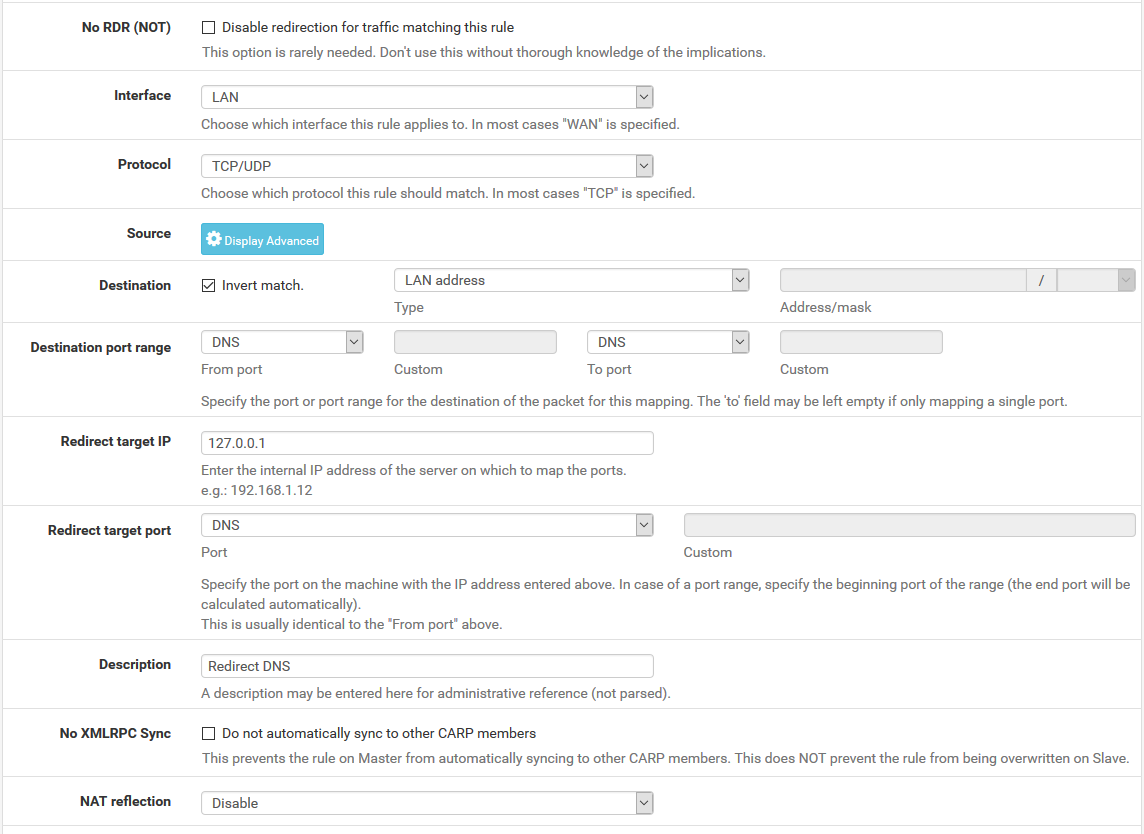
Fill in the following fields on the port forward rule:
- Interface
-
LAN
- Protocol
-
TCP/UDP
- Destination
-
Invert Match checked, LAN Address
- Destination Port Range
-
DNS (53)
- Redirect Target IP
-
127.0.0.1 - Redirect Target Port
-
DNS (53)
- Description
-
Redirect DNS - NAT Reflection
-
Disable
When complete, the port forward must appear as follows:
Note
If DNS requests to other DNS servers are blocked, such as by following Blocking External Client DNS Queries, ensure the rule to pass DNS to 127.0.0.1 is above any rule that blocks DNS.
With this port forward in place, DNS requests from local clients to any external IP address will result in the query being answered by the firewall itself. Access to other DNS servers on port 53 is impossible.
Tip
This can be adapted to allow access to only a specific set of DNS servers by changing the Destination network from “LAN Address” to an alias containing the allowed DNS servers. The Invert match box should remain checked.
Warning
Clients using DNS over TLS or DNS over HTTPS could circumvent this protection. Redirecting or blocking port 853 may help with DNS over TLS, depending on the clients.
See Blocking External Client DNS Queries for additional advice.